ControlUp bietet eine Vielzahl von Funktionen, um das digitale Erlebnis für Mitarbeiter zu verbessern, die jeden Desktop, jede Anwendung und jeden Ort nutzen.
Pulse AI analyzes real-time patterns across endpoints, apps, networks, and users. It suppresses expected activity to detect and alert only what matters.
Monitor, troubleshoot, and optimize every virtual desktop before slow sessions and app crashes interrupt your workforce.
ControlUp für DesktopsStay in control of every device. Prevent desktop issues before they disrupt employees or flood your IT queue.
ControlUp für ComplianceAutomate endpoint compliance across every device. Close security gaps and enforce policies without slowing IT down or getting in the way.
Pinpoint and fix SaaS and web app issues fast with real-time visibility across every device, browser, and network before employees feel the impact.
ControlUp Migrate für Windows 365Migrate faster with less risk. Automated workflows replace manual steps, so your move to Cloud PCs is done right.
ControlUp DaaS IQIntelligent autoscaling and cost control for Azure Virtual Desktop environments.
Smarter root cause analysis, automated remediation, and AI-powered diagnostics. Fix issues faster across every device and app.
Flickschusterei und Beseitigung von SchädenDeploy patches and remediate vulnerabilities across every endpoint, automatically and at scale. Stay secure without overwhelming IT.
Endpunktsicherheit und ComplianceSpot, prioritize, and remediate risks automatically. Keep endpoints secure and compliant without slowing desktop teams down.
Live-Remote-ManagementReal-time endpoint telemetry and silent remote remediation. See and fix issues the moment they happen, without disrupting the employee.
Proactively prevent issues and resolve tickets faster wherever hybrid workers are, whatever device they’re on.
Autonomer IT-BetriebShift IT from reactive to autonomous. Automatically detect, remediate, and prevent issues across your entire estate.
Steigern Sie die IT-EffizienzDo more with less. One platform to centralize visibility, streamline operations, and free IT to focus on what actually matters.
IT-KostenoptimierungRight-size VDI, reclaim unused licenses, and make smarter device refresh decisions backed by real usage data and performance metrics.
Entdecken Sie Inhalte, Tools und Erkenntnisse zur Vereinfachung der IT und zur Verbesserung der digitalen Mitarbeitererfahrung.
Eine globale Organisation von Technologieexperten, die den Markt für Desktop-Monitoring verändert.
ControlUp bietet eine Vielzahl von Funktionen, um das digitale Erlebnis für Mitarbeiter zu verbessern, die jeden Desktop, jede Anwendung und jeden Ort nutzen.
Pulse AI analyzes real-time patterns across endpoints, apps, networks, and users. It suppresses expected activity to detect and alert only what matters.
Monitor, troubleshoot, and optimize every virtual desktop before slow sessions and app crashes interrupt your workforce.
ControlUp für DesktopsStay in control of every device. Prevent desktop issues before they disrupt employees or flood your IT queue.
ControlUp für ComplianceAutomate endpoint compliance across every device. Close security gaps and enforce policies without slowing IT down or getting in the way.
Pinpoint and fix SaaS and web app issues fast with real-time visibility across every device, browser, and network before employees feel the impact.
ControlUp Migrate für Windows 365Migrate faster with less risk. Automated workflows replace manual steps, so your move to Cloud PCs is done right.
ControlUp DaaS IQIntelligent autoscaling and cost control for Azure Virtual Desktop environments.
Smarter root cause analysis, automated remediation, and AI-powered diagnostics. Fix issues faster across every device and app.
Flickschusterei und Beseitigung von SchädenDeploy patches and remediate vulnerabilities across every endpoint, automatically and at scale. Stay secure without overwhelming IT.
Endpunktsicherheit und ComplianceSpot, prioritize, and remediate risks automatically. Keep endpoints secure and compliant without slowing desktop teams down.
Live-Remote-ManagementReal-time endpoint telemetry and silent remote remediation. See and fix issues the moment they happen, without disrupting the employee.
Proactively prevent issues and resolve tickets faster wherever hybrid workers are, whatever device they’re on.
Autonomer IT-BetriebShift IT from reactive to autonomous. Automatically detect, remediate, and prevent issues across your entire estate.
Steigern Sie die IT-EffizienzDo more with less. One platform to centralize visibility, streamline operations, and free IT to focus on what actually matters.
IT-KostenoptimierungRight-size VDI, reclaim unused licenses, and make smarter device refresh decisions backed by real usage data and performance metrics.
Entdecken Sie Inhalte, Tools und Erkenntnisse zur Vereinfachung der IT und zur Verbesserung der digitalen Mitarbeitererfahrung.
Eine globale Organisation von Technologieexperten, die den Markt für Desktop-Monitoring verändert.
Edge DX customers love being able to monitor the performance of Unified Communication (UC) applications like Zoom or Teams and to carry out forensic analyses when they fail or behave poorly. But our customers have wanted more, so we are proud to announce that we now offer real-time UC monitoring – you can now instantaneously identify the UC calls having issues and, more importantly, why.
This feature is located under the Dashboards tab as Live-Anrufer Dashboard (Figure 1).
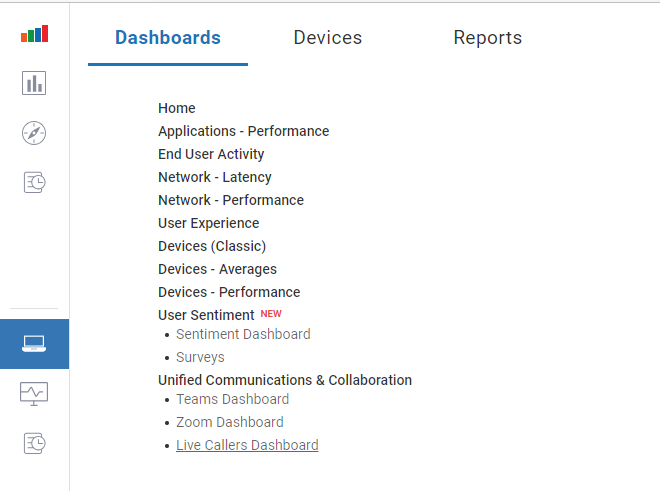
Figure 1 – Live-Anrufer Dashboard
This dashboard shows all the currently active Teams and Zoom calls.
The top of this dashboard (Figure 2) gives an overview of all the calls being monitored. This is useful for determining the overall health of an organization (User Distribution by Experience) or identifying the users having issues with their UC applications (Top Users by Worst Experience).
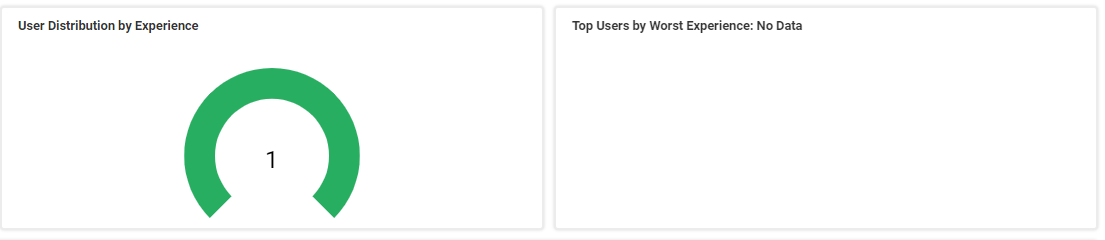
Figure 2 – Team and Zoom Calls Dashboard
The lower portion of the dashboard (Figure 3) lists all the live calls.

Figure 3 – Live Calls
If you are investigating a particular user, enter their name or the device’s name in the search box. If you are looking for users having a poor experience, you can sort by the Score column.
Clicking a device will bring you to its dashboard (Figure 4), where you can look more closely at it.
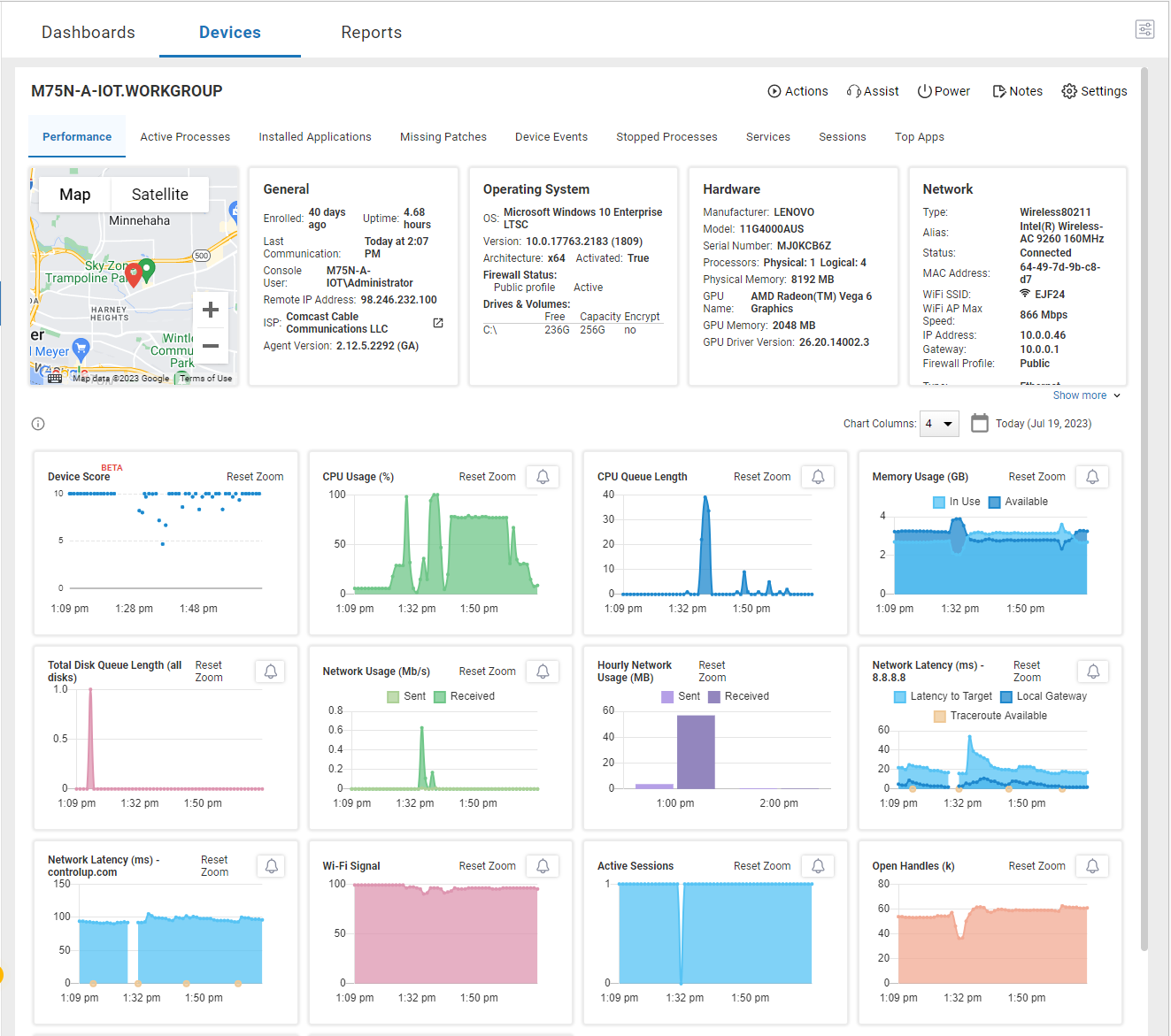
Figure 4 – Device Dashboard
From this page, you can view all metrics for the device or interact with it using Edge DX’s Actions und Assist features. For example, if you need to clear a user’s Zoom cache, you could run a predefined script on it or instantiate a remote shell and do it manually. If you want to see what the user is experiencing, you could use Fernsteuerung oder Remote Shadow. These tools allow you to quickly identify issues that may be causing the problem.
In one case, a Zoom user’s call kept cutting out. We could see the problem in real-time using the Live-Anrufer dashboard; we navigated to the device we saw had high CPU usage (Figure 5).
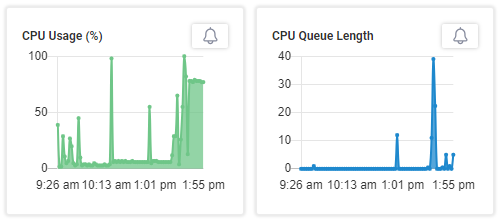
Figure 5 – Live Callers CPU Usage
We used the device’s Active Processes dashboard (Figure 6) to determine that PowerShell scripts consumed about 75% of the CPU cycles.
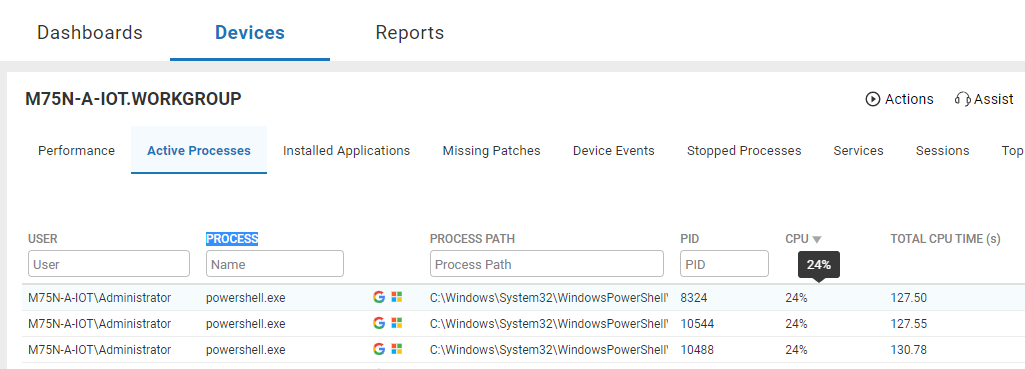
Figure 6 – Active Processes Dashboard
After conferring with the user, we killed the applications (Figure 7) from the same dashboard.

Figure 7 – Applications
Within seconds, the call improved, and the CPU utilization returned to normal (Figure 8).

Figure 8 – CPU Status
We know that UC applications like Teams and Zoom are the communications backbone for many organizations. Using our new Live Callers dashboard, you can monitor these applications in real time and correct issues that may be causing users to have a less-than-ideal digital experience.
For more information, be sure to visit our Edge DX page oder eine Demo planen with a ControlUp sales engineer.