
The Device Health and Rightsizing Dashboard offers IT professionals a data-driven solution to optimize device lifecycle management by providing a comprehensive scoring and classification system based on correlated telemetry.
- It utilizes a "Penalty First" scoring model across five weighted pillars: Resource Usage, Stability, Battery Health, OS Lifecycle, and Storage Capacity to determine a device's health.
- The system classifies devices as undersized, oversized, or appropriate, identifies the primary root cause of issues, and offers confidence scores for data quality.
- This approach enables proactive lifecycle operations, supporting informed decisions for device replacement, refurbishment, extension, and repurposing based on technical signals rather than age.
Most IT professionals already understand the lifecycle problem. Refreshing devices strictly by age creates waste. Extending devices without telemetry introduces risk. Traditional experience analytics do not give the depth of data required for lifecycle decision making.
The Device Health and Rightsizing Dashboard solves this by providing a complete scoring and classification system built on correlated telemetry across performance, stability, battery, storage, and operating system support. The following is a technical overview of how the system works and how IT teams can leverage it for real lifecycle operations.
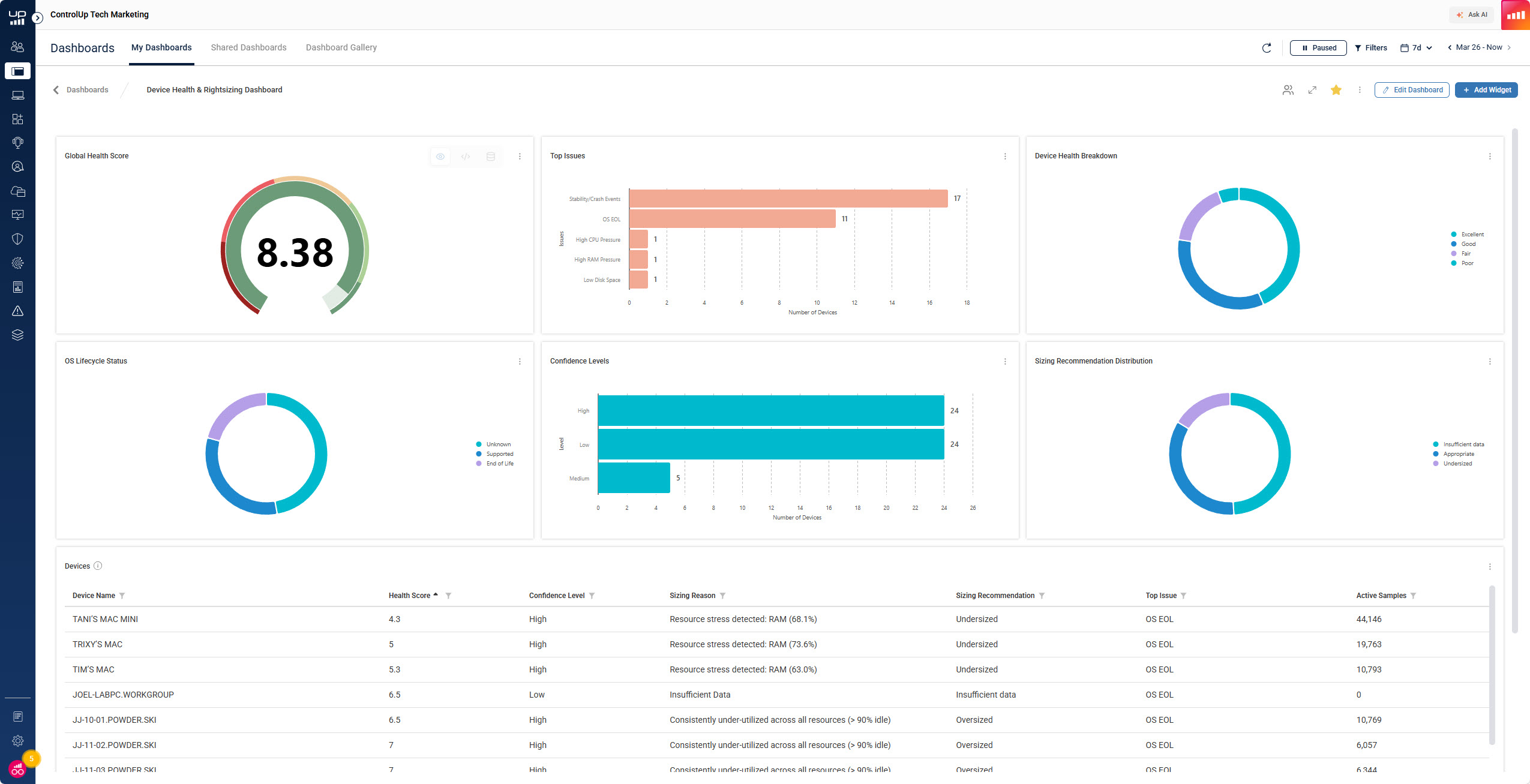
The Device Health Score: How the Scoring Model Works
ControlUp uses a Penalty First scoring model. Every device begins at a score of 10.0 and deductions are applied based on measurable problems. This avoids inflated scores and ensures that issues are treated as primary indicators rather than optional context.
The health score comes from five weighted pillars.
1. Resource Usage (30 percent weight)
Devices are evaluated based on breach conditions for CPU, RAM, disk, and GPU. Breaches occur when usage crosses thresholds associated with degraded user experience.
- CPU breach occurs above 80 percent utilization
- RAM breach occurs when less than 10 percent memory remains
- Disk breach occurs above 60 percent active time
- GPU breach occurs above 80 percent utilization
The model tracks how often breaches occur during active sessions. More time in breach results in heavier penalties.
2. Stability (20 percent weight)
The stability pillar captures real failure events.
For Windows:
- Application crashes
- System freezes
- Blue screen events
For macOS and Linux:
- Sustained CPU and RAM pressure is used as a proxy for instability because native crash reporting is inconsistent
Stability scoring indirectly reflects Mean Time Between Failures across the last 14 days of active usage.
3. Battery Health (25 percent weight)
This applies to laptops only.
- Above 80 percent capacity is considered healthy
- Below 50 percent capacity incurs heavy penalties
Low battery health is one of the leading contributors to poor mobile user experience.
4. Operating System Lifecycle (15 percent weight)
ControlUp automatically detects:
- Supported OS
- Near end of life
- Unsupported
If the OS is unsupported, the maximum possible device score is capped at 7.0 regardless of performance. This ensures lifecycle risk is not masked by healthy hardware.
This is especially relevant as Windows 10 reaches end of support. Microsoft now provides extended security updates for Microsoft 365 apps on Windows 10 until October 10, 2028.
5. Storage Capacity (10 percent weight)
Penalties apply when:
- Free disk space drops below 15 percent
- Severe penalties at below 5 percent
Storage is directly tied to update reliability and application behavior.
Rightsizing Classification: How the Dashboard Determines Undersized, Oversized, or Appropriate
The dashboard uses dual band analysis that measures both resource pressure and idle capacity.
This determines whether the device is correctly provisioned for its user’s real workload.
- Undersized: Occurs when core resources breach healthy thresholds more than 15 percent of active time. This indicates that the device cannot support the workload.
- Oversized: Occurs when resources remain largely unused, for example CPU below 40 percent and RAM above 60 percent free for over 90 percent of active time. This indicates unnecessary hardware cost.
- Appropriate: Resources match user workload with neither frequent breaches nor excessive idle time. No action required.
- Insufficient Data: Fewer than 100 data points exist, which is roughly 1.6 hours of active use. The system does not classify rightsizing until enough data is collected.
Top Issue Detection: The Primary Root Cause Indicator
The scoring engine identifies the single most impactful issue affecting each device.
Common high priority issues include:
- Unsupported operating system
- Near end-of-life OS
- Battery degradation
- Stability failures
- Low disk capacity
This makes triage and prioritization significantly more efficient.
Confidence Scoring: Data Quality Controls
ControlUp attaches a confidence level based on the amount of usable telemetry.
- High confidence at more than 1,000 data points
- Medium confidence at 100 to 1,000 data points
- Low confidence below 100 data points
This prevents IT teams from making decisions based on insufficient short-term data.
Operational Use Cases for Technical Teams
With the scoring model, stability tracking, OS lifecycle detection, and rightsizing classification in place, technical teams can apply the data in several lifecycle workflows.
1. Identify devices eligible for Windows 10 extension
Healthy Windows 10 devices can safely remain in service with Microsoft 365 security updates available until October 2028.
2. Upgrade components such as RAM or battery instead of replacing a device
If resource pressure is isolated to RAM or battery health is below 50 percent, a small component upgrade may restore normal performance.
3. Prioritize devices that require immediate replacement
Devices with:
- Frequent stability failures
- Unsupported OS
- High breach ratios are ideal candidates for early retirement.
4. Repurpose devices for VDI
Healthy but older hardware can be converted to thin client endpoints using IGEL or Stratodesk images.
5. Retain Windows 10 on devices that serve as Cloud PC clients
Microsoft has extended free Microsoft 365 support for Windows 10 until 2028 for these usage scenarios. This is especially useful for Cloud PC deployments.
Fleet Level Outcomes for Technical Teams
Once deployed, the Device Health and Rightsizing Dashboard enables:
- Fleet wide scoring and ranking
- Identification of problematic hardware models
- Detection of unsustainable OS distributions
- Verification of physical resource constraints in relation to workloads
- Prioritized remediation pipelines based on Top Issue categories
- Improved forecasting for procurement and refresh cycles
This moves lifecycle operations from reactive to proactive and from age based to data driven.
Conclusion
IT teams have always needed a complete, correlated view of hardware condition, OS lifecycle, stability, resource consumption, and battery health. The Device Health and Rightsizing Dashboard finally delivers this capability in a consolidated, technically meaningful scoring model.
This is not just an experience metric. It is a lifecycle decision engine that provides the technical signals required for accurate device replacement, refurbishment, extension, and repurposing.
