PLATFORM

Automation & Workflows

Turn IT automation into measurable outcomes for everyone. ControlUp Workflows puts repetitive issues on autopilot with a no-code interface, preventing tickets before they happen and powering a digital workspace that fixes itself.

Try for Free Get a Demo

Proactive IT for Productive Workdays

Manually fixing recurring digital workspace issues is inefficient and error-prone. Powered by the ControlUp ONE DEX platform and IT automation tools, Workflows anticipate problems before they disrupt employees and apply consistent, condition-based responses to keep everyone productive. By shifting routine resolution to automation, IT teams can focus on innovation and long-term strategy instead of day-to-day firefighting.
From “Rule-based” to “Outcome-based”
Workflows elevate IT process automation beyond table-stakes rules. They stop problems from piling up, improve digital employee experience (DEX), and free IT from tedious tasks. No-code advanced automation is now accessible and fast, creating a truly self-healing digital workplace.
Simplify IT Workflows

Complex automation, made simple.

What once required expert scripting skills is now accessible to everyone. Build advanced automations in minutes, cut costs, and free up IT pros for higher-value projects.

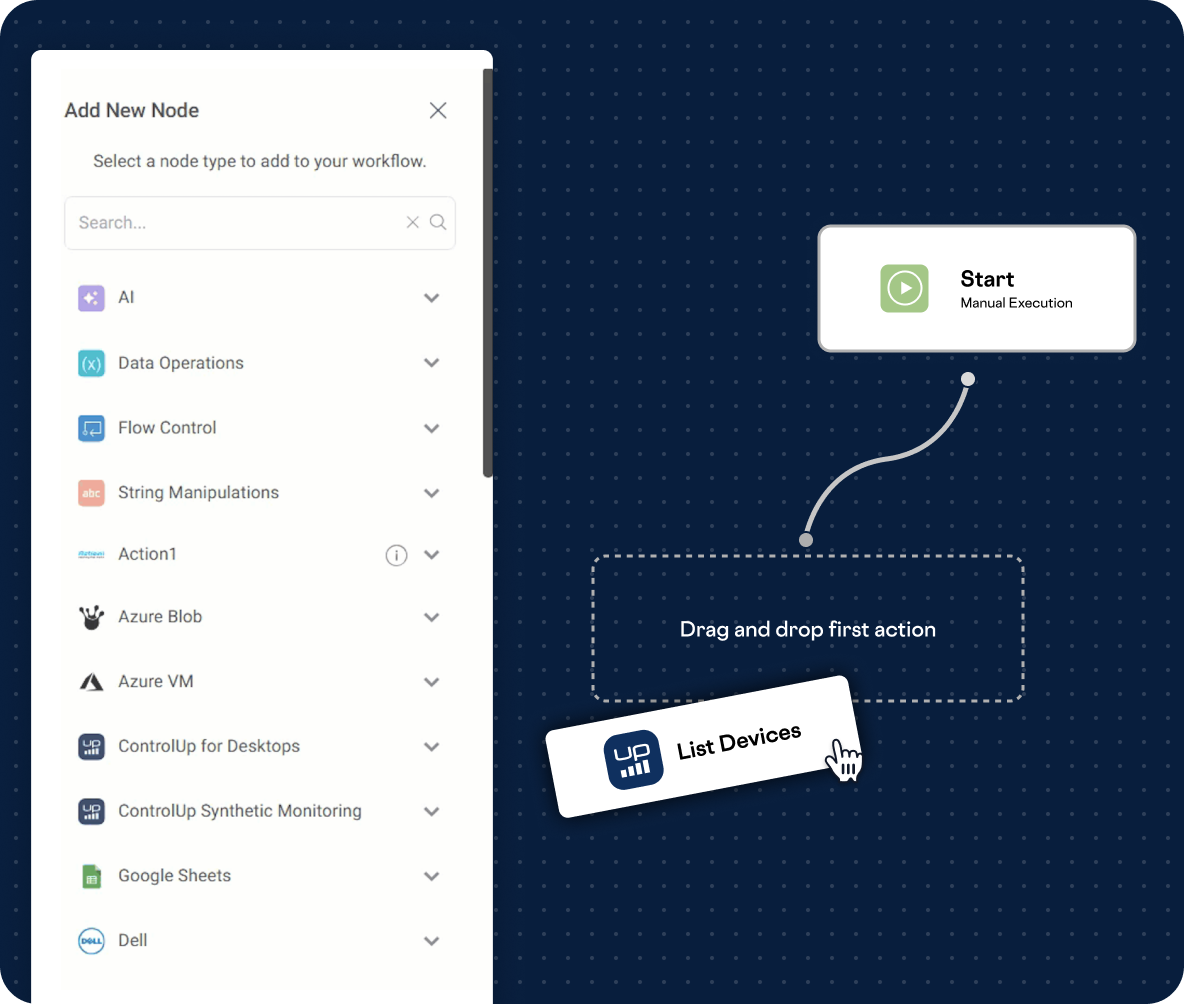
  • Visual workflow builder: A free-form, no-code, drag & drop canvas makes even the most complex workflows intuitive to design and easy to build. No coding or advanced scripting skills required.
  • Fast time-to-value: Use pre-built workflow templates tailored to common IT challenges. Then, select the integrations you want to use and run your new flows.
  • Integrations that scale: Over 25 nodes for leading market solutions unlock 100s of automation actions, making the possibilities limitless.
Autonomous Self-Healing

Resolve problems before users feel the pain.

Lower IT ticket volume and avoid productivity pitfalls by solving issues in record time, keeping experiences seamless so everyone leaves work happy.

  • Fix issues in real time: Industry-leading 3-second data collection means problems can be caught and resolved, often before users even notice.
  • Granular control: Trigger automations from a single data point or combine thousands of available metrics to cover any possible scenario.
  • Built-in or custom actions: Use 500+ action scripts from our library or bring your own in PowerShell, Python, and more.
Proactive Investigation

Not every issue can self-heal, but automation still helps.

When unique or unpredictable issues occur, workflows still help streamline troubleshooting and accelerate resolution.

  • Augmented troubleshooting: Our Script Library has various scripts, in addition to remediation scripts, to automatically collect deeper logs and detailed metrics for faster root cause analysis.
  • Seamless ITSM integration: Trigger parallel workflows in ServiceNow or other systems via webhooks.
  • Notifications and engagement: Set up notifications whenever an automation starts, via email, Microsoft Teams, or Slack. Engage employees directly with our sentiment survey feature.
Dashboards and Insights

Prove the value of automation with data that matters.

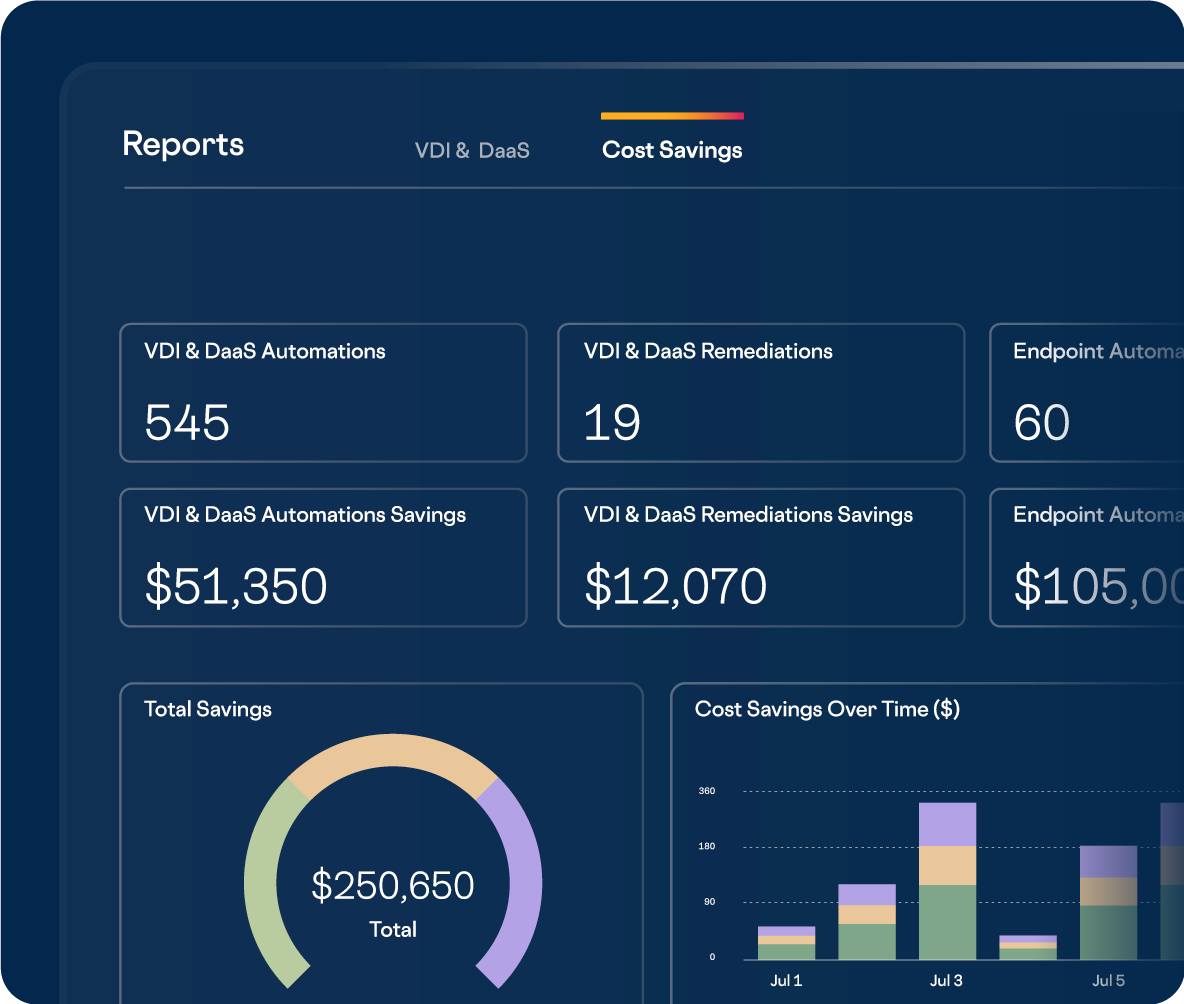
Reporting and insights empower you to measure performance, track results, share cost savings, and make the business case for automation undeniable.

  • Widgets and drill down: Get a high-level view of how many automations ran recently and drill down into the details of a specific physical endpoint or across any part of your VDI & DaaS environment.
  • Detailed reporting and auditing: Know the target, the timing, and the results of automated actions that ran in your environment. Find the data you need with powerful filters and search capabilities.
  • Cost savings visibility: See time and money saved from automation across physical endpoints, VDI, and DaaS, all calculated with configurable settings to match your IT operations.
FAQs
How can IT teams automate employee onboarding and offboarding across multiple applications without writing complex scripts?
ControlUp Workflows eliminates the manual toil of user lifecycle management through a visual, drag-and-drop orchestration engine. IT teams can connect native integrations for Microsoft Intune, Entra ID, and Google Workspace to build automated flows that provision devices, configure accounts, and assign permissions instantly. This ensures that when a user's status changes, access is automatically granted or revoked across the entire environment, maintaining both security and productivity.
How can the entire incident response chain—from alert to ticket to notification—be automated?
ControlUp Workflows connects disparate IT tools into a unified, automated response chain using event-based Listener triggers. When the platform detects a critical performance anomaly or security event, the workflow autonomously creates an incident in ITSM systems (such as ServiceNow or Zendesk), executes a targeted remediation process, and alerts the appropriate staff via Microsoft Teams or Slack. This orchestration ensures high-priority issues are addressed instantly without requiring human intervention to start the process.
Is there a way for non-coding IT professionals to build advanced remediation processes that require conditional logic and approvals?
The ControlUp low-code canvas democratizes advanced automation by providing a "no-code" interface for complex logic. IT professionals can utilize Flow Control nodes to introduce loops, conditional branching, and data manipulation into their remediation workflows. Additionally, hosted HTML forms can be integrated into these flows to safely collect user input or change request approvals, ensuring that even complex, multi-step processes remain governed and secure without requiring PowerShell expertise.
How can recurring system maintenance and critical backup procedures be put on autopilot to ensure consistency?
ControlUp Workflows utilizes Schedule triggers to automate routine maintenance tasks and system checks at predefined intervals. To accelerate deployment, the platform provides a library of pre-built Workflow Templates tailored for common service desk and infrastructure tasks. This allows IT teams to move recurring operations to a "set-and-forget" automated state, ensuring critical maintenance is never missed due to manual oversight.
How does automation assist in analyzing complex support logs and tickets to accelerate root-cause analysis?
ControlUp Workflows incorporates intelligent, AI-powered nodes directly into the orchestration canvas to perform advanced data analysis at scale. These nodes can be configured to ingest incoming support tickets and system logs, providing automated summaries, sentiment analysis, and diagnostic insights. By incorporating Pulse AI into the workflow, the system can even generate draft communications for end users or suggest remediation steps based on the narrative in the technical data.
Get a Personalized Demo
Stop wasting hours on complex IT problems. See how ControlUp can identify issues and automate fixes in minutes instead.
Get a Demo