
ControlUp offers a rich set of capabilities to improve the digital experience for employees using any desktop, any application, anywhere.
Pulse AI analyzes real-time patterns across endpoints, apps, networks, and users. It suppresses expected activity to detect and alert only what matters.
Monitor, troubleshoot, and optimize every virtual desktop before slow sessions and app crashes interrupt your workforce.
ControlUp for DesktopsStay in control of every device. Prevent desktop issues before they disrupt employees or flood your IT queue.
ControlUp for ComplianceAutomate endpoint compliance across every device. Close security gaps and enforce policies without slowing IT down or getting in the way.
Pinpoint and fix SaaS and web app issues fast with real-time visibility across every device, browser, and network before employees feel the impact.
ControlUp Migrate for Windows 365Migrate faster with less risk. Automated workflows replace manual steps, so your move to Cloud PCs is done right.
ControlUp DaaS IQIntelligent autoscaling and cost control for Azure Virtual Desktop environments.
Smarter root cause analysis, automated remediation, and AI-powered diagnostics. Fix issues faster across every device and app.
Patching & RemediationDeploy patches and remediate vulnerabilities across every endpoint, automatically and at scale. Stay secure without overwhelming IT.
Endpoint Risk MitigationSpot, prioritize, and remediate risks automatically. Keep endpoints secure and compliant without slowing desktop teams down.
Live Remote ManagementReal-time endpoint telemetry and silent remote remediation. See and fix issues the moment they happen, without disrupting the employee.
Proactively prevent issues and resolve tickets faster wherever hybrid workers are, whatever device they’re on.
Autonomous IT OperationsShift IT from reactive to autonomous. Automatically detect, remediate, and prevent issues across your entire estate.
Increase IT EfficiencyDo more with less. One platform to centralize visibility, streamline operations, and free IT to focus on what actually matters.
IT Cost OptimizationRight-size VDI, reclaim unused licenses, and make smarter device refresh decisions backed by real usage data and performance metrics.
Explore content, tools, and insights to simplify IT and improve the digital employee experience.
A global organization of technology professionals transforming the desktop monitoring marketplace.
ControlUp offers a rich set of capabilities to improve the digital experience for employees using any desktop, any application, anywhere.
Pulse AI analyzes real-time patterns across endpoints, apps, networks, and users. It suppresses expected activity to detect and alert only what matters.
Monitor, troubleshoot, and optimize every virtual desktop before slow sessions and app crashes interrupt your workforce.
ControlUp for DesktopsStay in control of every device. Prevent desktop issues before they disrupt employees or flood your IT queue.
ControlUp for ComplianceAutomate endpoint compliance across every device. Close security gaps and enforce policies without slowing IT down or getting in the way.
Pinpoint and fix SaaS and web app issues fast with real-time visibility across every device, browser, and network before employees feel the impact.
ControlUp Migrate for Windows 365Migrate faster with less risk. Automated workflows replace manual steps, so your move to Cloud PCs is done right.
ControlUp DaaS IQIntelligent autoscaling and cost control for Azure Virtual Desktop environments.
Smarter root cause analysis, automated remediation, and AI-powered diagnostics. Fix issues faster across every device and app.
Patching & RemediationDeploy patches and remediate vulnerabilities across every endpoint, automatically and at scale. Stay secure without overwhelming IT.
Endpoint Risk MitigationSpot, prioritize, and remediate risks automatically. Keep endpoints secure and compliant without slowing desktop teams down.
Live Remote ManagementReal-time endpoint telemetry and silent remote remediation. See and fix issues the moment they happen, without disrupting the employee.
Proactively prevent issues and resolve tickets faster wherever hybrid workers are, whatever device they’re on.
Autonomous IT OperationsShift IT from reactive to autonomous. Automatically detect, remediate, and prevent issues across your entire estate.
Increase IT EfficiencyDo more with less. One platform to centralize visibility, streamline operations, and free IT to focus on what actually matters.
IT Cost OptimizationRight-size VDI, reclaim unused licenses, and make smarter device refresh decisions backed by real usage data and performance metrics.
Explore content, tools, and insights to simplify IT and improve the digital employee experience.
A global organization of technology professionals transforming the desktop monitoring marketplace.
Good news – vGPU adoption is skyrocketing. Bad news – vGPU environments aren’t being managed as well as they should. Until now…
The benefits of virtual GPU (vGPU) in a VDI environment are becoming clearer every day (here’s an example). It’s difficult to find a use case that’s not graphics-intensive. Medical image processing? Yes. Video-embedded applications? Sure. A web surfing browser? Of Course. A terminal window? Okay, you get the picture.
Users demand a better experience when using graphics-intensive applications. While it might be okay for a timecard form to load slightly slowly, it’s not acceptable for a video to jitter.
Between the options of throwing more CPU at the problem or taking the vGPU route, the answer is obvious. And that’s is why we’re seeing a rapid adoption of vGPU in VDI environments.
While vGPU provides a major boost to users’ experience, managing your vGPU resources remains tricky. Although vGPU vendors provide good monitoring options, they are focused on specific use cases, and it is impossible to get a “user-view” of exactly how much improvement vGPU has brought and see all your vGPUs troop real time usage. That’s where we step in.
With ControlUp 7.1 we have introduced vGPU metrics to the ControlUp console. Let’s take a look at what’s possible with these new additions:
– Static VM level metrics like vGPU Model and architecture, number of cores and driver version
– Runtime VM level metrics like available memory, frame buffer size and amount allocated, video encoder and encoder usage.
– Runtime process level metrics show how many vGPU resources each relevant process consumes.
– Once historical and trending vGPU metrics will be added to ControlUp Insights (coming soon), you’ll be able to answer questions like: “which applications are the most vGPU intensive?” Or ”At our current growth rate how long until we need to add more resources?”
Let’s see what it actually looks like, starting with VM level vGPU metrics:

As always with ControlUp you can drill down to see these vGPU metrics for the processes inside a VM. Double clicking on ‘WIN1_GPU_V52, drills down to process level view –
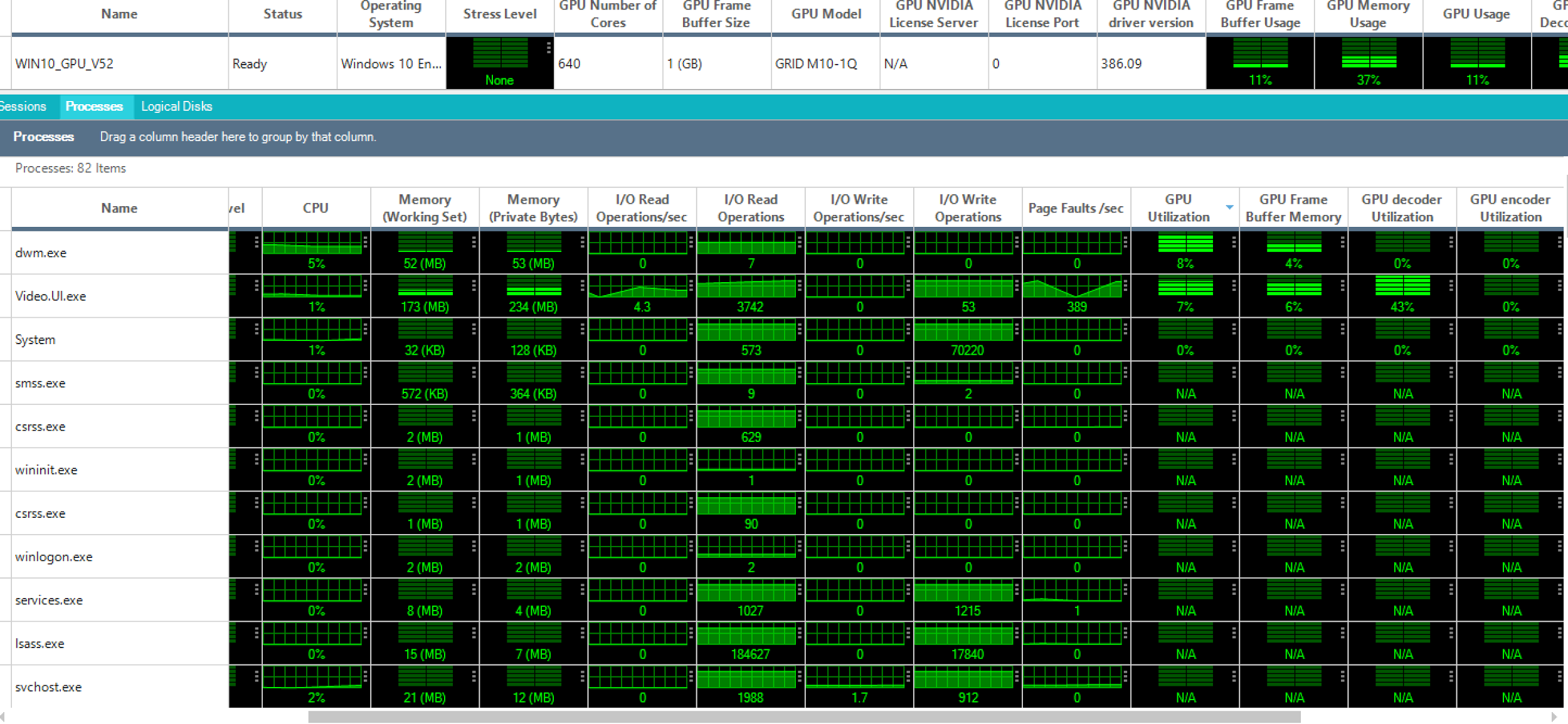
Through our agent you get an in-guest view into vGPU resource usage and consumption, such as what percentage of GPU was used by this virtual OS? Which process within this user’s OS consumed how much processing and memory? And of course who are the users that consumes a bigger portion of the vGPUs.
I invite you to download our 7.1 beta and check this out for yourself in your vGPU environment!