
ControlUp offers a rich set of capabilities to improve the digital experience for employees using any desktop, any application, anywhere.
Pulse AI analyzes real-time patterns across endpoints, apps, networks, and users. It suppresses expected activity to detect and alert only what matters.
Monitor, troubleshoot, and optimize every virtual desktop before slow sessions and app crashes interrupt your workforce.
ControlUp for DesktopsStay in control of every device. Prevent desktop issues before they disrupt employees or flood your IT queue.
ControlUp for ComplianceAutomate endpoint compliance across every device. Close security gaps and enforce policies without slowing IT down or getting in the way.
Pinpoint and fix SaaS and web app issues fast with real-time visibility across every device, browser, and network before employees feel the impact.
ControlUp Migrate for Windows 365Migrate faster with less risk. Automated workflows replace manual steps, so your move to Cloud PCs is done right.
ControlUp DaaS IQIntelligent autoscaling and cost control for Azure Virtual Desktop environments.
Smarter root cause analysis, automated remediation, and AI-powered diagnostics. Fix issues faster across every device and app.
Patching & RemediationDeploy patches and remediate vulnerabilities across every endpoint, automatically and at scale. Stay secure without overwhelming IT.
Endpoint Risk MitigationSpot, prioritize, and remediate risks automatically. Keep endpoints secure and compliant without slowing desktop teams down.
Live Remote ManagementReal-time endpoint telemetry and silent remote remediation. See and fix issues the moment they happen, without disrupting the employee.
Proactively prevent issues and resolve tickets faster wherever hybrid workers are, whatever device they’re on.
Autonomous IT OperationsShift IT from reactive to autonomous. Automatically detect, remediate, and prevent issues across your entire estate.
Increase IT EfficiencyDo more with less. One platform to centralize visibility, streamline operations, and free IT to focus on what actually matters.
IT Cost OptimizationRight-size VDI, reclaim unused licenses, and make smarter device refresh decisions backed by real usage data and performance metrics.
Explore content, tools, and insights to simplify IT and improve the digital employee experience.
A global organization of technology professionals transforming the desktop monitoring marketplace.
ControlUp offers a rich set of capabilities to improve the digital experience for employees using any desktop, any application, anywhere.
Pulse AI analyzes real-time patterns across endpoints, apps, networks, and users. It suppresses expected activity to detect and alert only what matters.
Monitor, troubleshoot, and optimize every virtual desktop before slow sessions and app crashes interrupt your workforce.
ControlUp for DesktopsStay in control of every device. Prevent desktop issues before they disrupt employees or flood your IT queue.
ControlUp for ComplianceAutomate endpoint compliance across every device. Close security gaps and enforce policies without slowing IT down or getting in the way.
Pinpoint and fix SaaS and web app issues fast with real-time visibility across every device, browser, and network before employees feel the impact.
ControlUp Migrate for Windows 365Migrate faster with less risk. Automated workflows replace manual steps, so your move to Cloud PCs is done right.
ControlUp DaaS IQIntelligent autoscaling and cost control for Azure Virtual Desktop environments.
Smarter root cause analysis, automated remediation, and AI-powered diagnostics. Fix issues faster across every device and app.
Patching & RemediationDeploy patches and remediate vulnerabilities across every endpoint, automatically and at scale. Stay secure without overwhelming IT.
Endpoint Risk MitigationSpot, prioritize, and remediate risks automatically. Keep endpoints secure and compliant without slowing desktop teams down.
Live Remote ManagementReal-time endpoint telemetry and silent remote remediation. See and fix issues the moment they happen, without disrupting the employee.
Proactively prevent issues and resolve tickets faster wherever hybrid workers are, whatever device they’re on.
Autonomous IT OperationsShift IT from reactive to autonomous. Automatically detect, remediate, and prevent issues across your entire estate.
Increase IT EfficiencyDo more with less. One platform to centralize visibility, streamline operations, and free IT to focus on what actually matters.
IT Cost OptimizationRight-size VDI, reclaim unused licenses, and make smarter device refresh decisions backed by real usage data and performance metrics.
Explore content, tools, and insights to simplify IT and improve the digital employee experience.
A global organization of technology professionals transforming the desktop monitoring marketplace.
September 28, 2020: Microsoft’s Azure Active Directory (Azure AD) had an outage.
The outage occurred between 2:25PM PST and 5:23PM PST and affected authentication services, preventing users from logging on and using resources hosted on Azure. Microsoft posted a root cause analysis detailing the incident.

Scoutbees—ControlUp’s synthetic testing application—immediately picked up on the outage, and proactively alerted its users about the issue in their environment. The screenshot below was captured from a browser at 5:15 p.m. EDT.
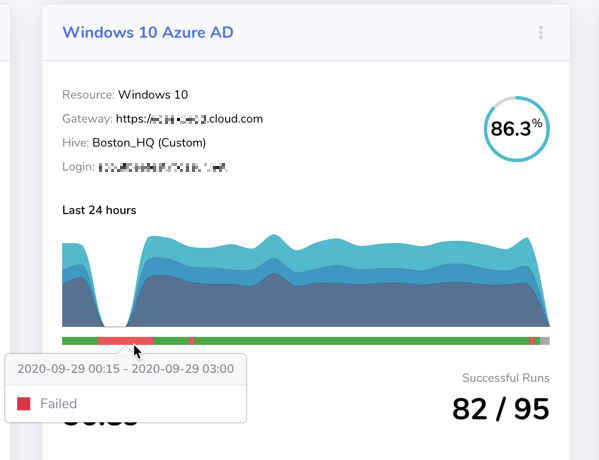
Scoutbees correctly identified the issue as an authentication failure, giving our customers in-depth information on pinpointing the root cause of the problem!
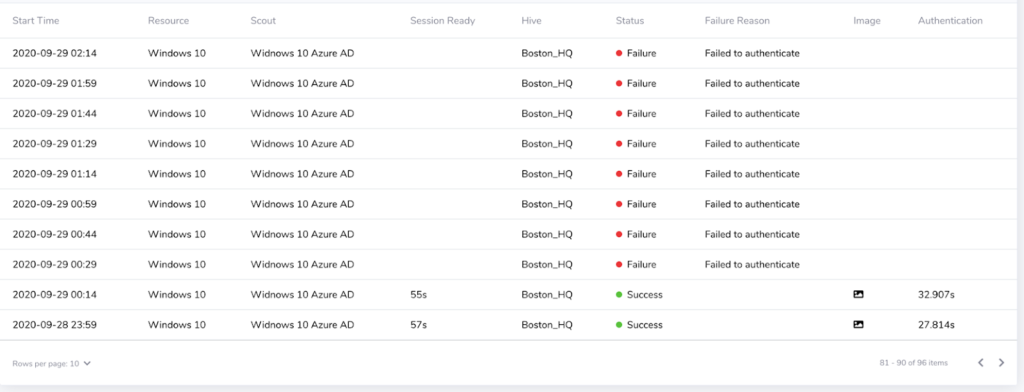
Without Scoutbees, IT’s first line of information is usually end-users calling the help desk to complain about the error messages they get when trying to log in to their applications. In a case like this, they might tell your helpdesk that they were getting error “HTTP ERROR 503”:

“HTTP ERROR 503” doesn’t really provide much information about the problem. Googling the error message will return the generic “Service Unavailable.” You might think, “Service Unavailable? For Azure?” Further investigation would be required.
Being in IT, you might have authenticated into Azure, prior to the outage, to manage your resources. Given that, your experience would be inconsistent with your users, because Azure was working fine for you. “Azure is down? What? Could it just be my user’s home WiFi connection?”
In a situation like this, your help desk would get overwhelmed with calls from users reporting the same thing. Tickets would get escalated, and panic would set in, as you investigate what in the heck was going on. Is your first step checking social media to see if it’s just you experiencing the outage? Should it be?!
IT SHOULD NOT BE. With Scoutbees and its best-in-class synthetic testing, you’d have received a proactive alert about the outage and would have knows what was going on before it even popped up on Twitter:
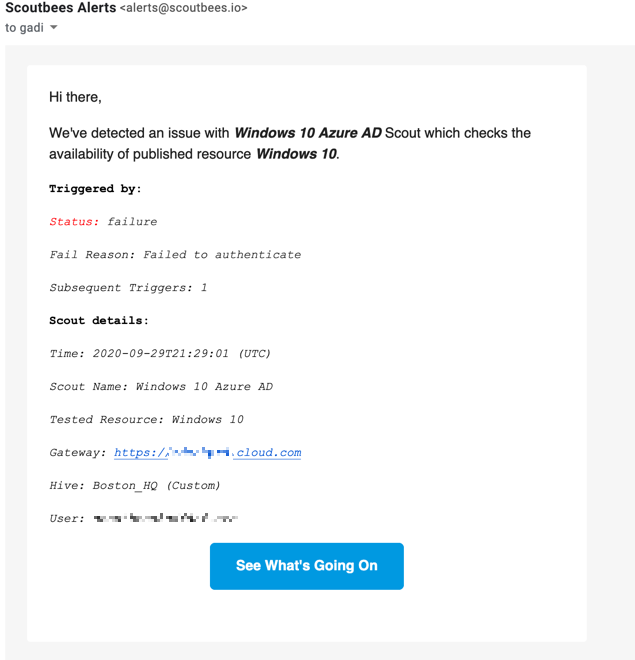
With this information, you can give your help desk advanced warning or even proactively alert your users about a potential problem and to check your support page for outage information.
Learn More about ControlUp with Microsoft Azure
Related Links: