Let’s talk about AVD Autoscale.
How Native Azure Virtual Desktop Autoscaling Works
Microsoft’s built-in autoscale is a schedule-driven process. There are two mechanisms you can use today. Power management autoscaling (powers on and off session hosts) and Dynamic autoscaling (in preview at the time of this writing), which can also create and delete session hosts. Both of these tools use session capacity percentage as their trigger — not CPU, RAM or other user experience metrics.
Microsoft’s built-in autoscaling is rigid in exactly the way native tooling tends to be. It gives you a fixed, schedule-driven model and expects your environment to fit inside it: ramp-up, peak hours, ramp-down, and off-peak.
You can’t shoehorn every customer into the same box
That sounds fine until you remember that not every AVD environment behaves like a neat, predictable 9-to-5. Some host pools really only need two states. Others need a pre-warm block, a lunch dip, a second-shift ramp, or some other intra-day variation. The issue is not that the four phases are always wrong. It is that they are always there, whether you need all four or not, and they still are not enough when your environment needs something more nuanced.
And it is not just Azure.
A lot of the competing products are not meaningfully more flexible either, because they still box you into some variation of a default schedule and an alternative schedule. That is only marginally better than a hard four-phase template. It is still the product telling you how to think about your day, instead of letting you model how your users actually work. That is why simple changes like a shorter Friday, a lunch-time dip, or a split-shift pattern can turn into reconfiguration pain, extra policies, or flat-out limitations in native Azure and other products. By contrast, DaaS IQ’s scheduler is built around assigning the right policy to the right block of time. For example, one environment may need two policies while another needs three. That is a much better reflection of the real world than pretending every pool fits into “default” and “alternative.”
What Admins want today
- Better user experience when defining power scaling schedules
- Metric-based triggers (CPU + Memory + Session simultaneously).
- Thoughtfully designed scale-out/scale-in logic
- Stabilization window / cooldown
- Shared, reusable policies across multiple host pools
- To configure holiday scaling policies without having to manually configure holidays
How DaaS IQ solves these challenges
Better user experience when defining power scaling schedules
They say a picture is worth a thousand words. Here is how ControlUp DaaS IQ presents scaling policies:
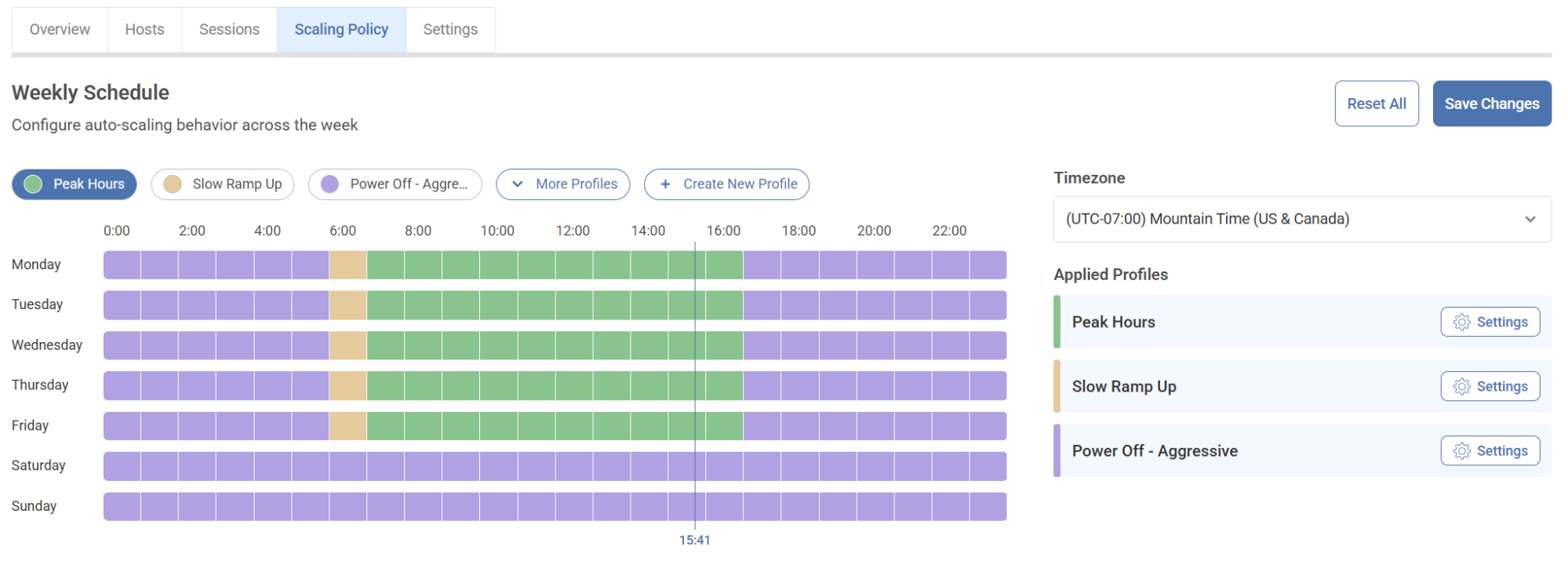
Just by looking at this image you get a fantastic sense of what scaling policy should be applied right now and where we are in time. The vertical line at “15:41” is the time that this screenshot was taken. It’s a Tuesday so the Peak Hours policy is being applied. If I wanted to make a change like, shorten up Friday as it’s been noticed most people leave two hours earlier than the other weekdays, it’s incredibly easy to make this change.
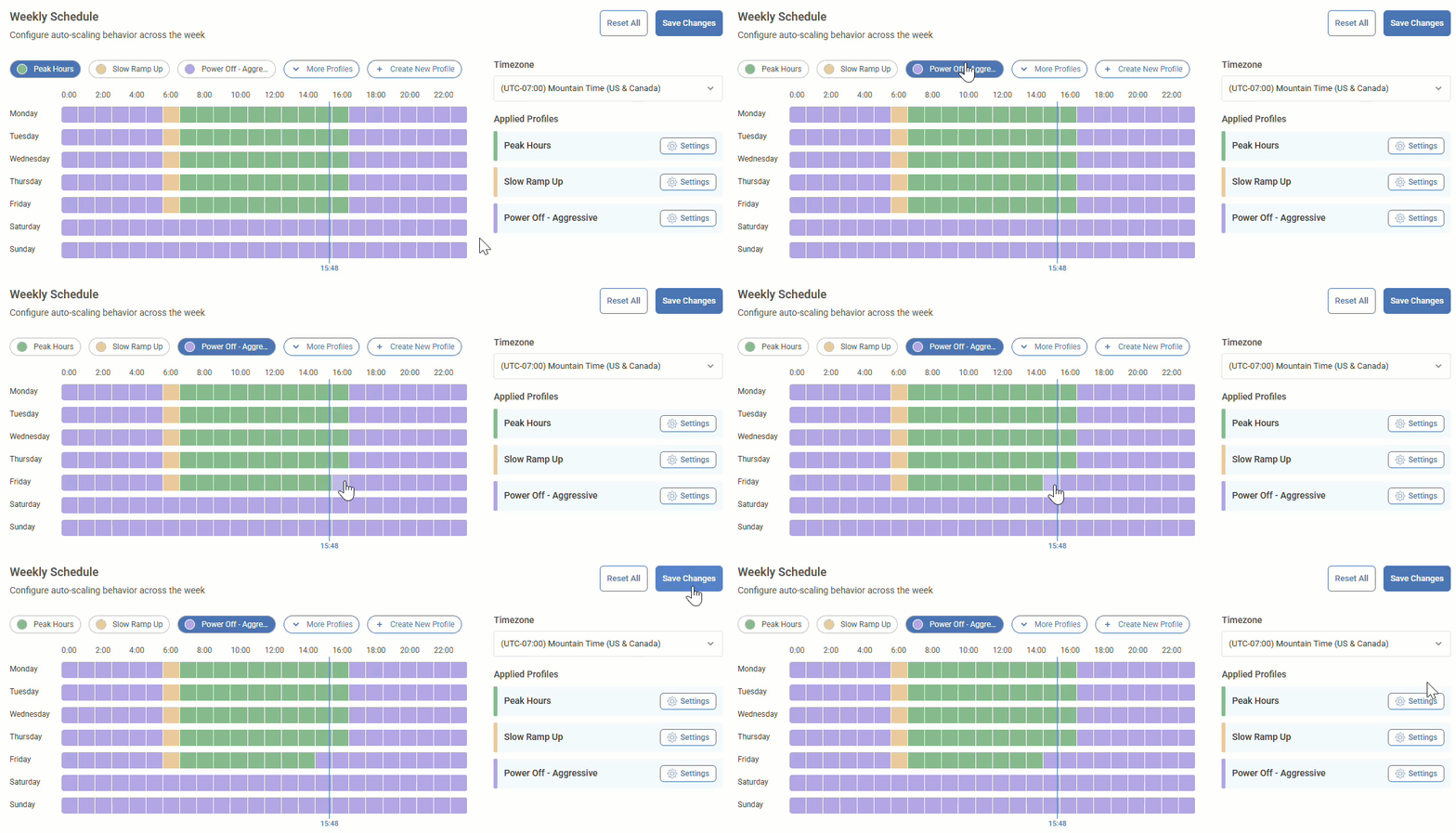
Did you catch it?
If you’ve worked with the native Azure scaling plans or other products than this, incredibly simple change becomes a nightmare of reconfiguration, additional policies or is just not even possible. With ControlUp DaaS IQ, we can make these types of modifications in seconds! And with incredible ease and predictability! The graphical nature of applying scaling policies in ControlUp makes a complex task simple.
This task took 4 clicks.
1 to change the policy, 2 clicks to paint the policy on the appropriate time/day and 1 to save it.
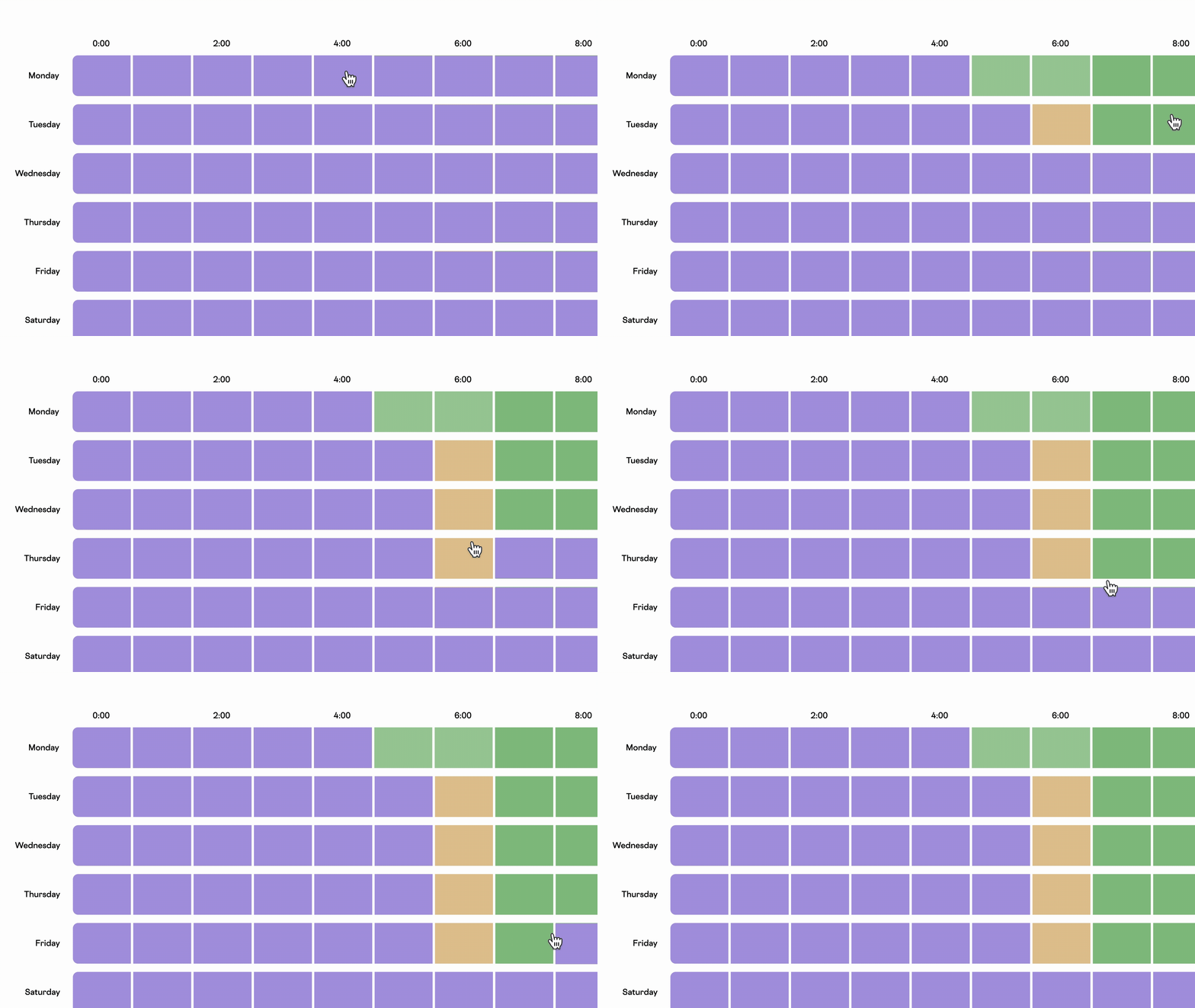
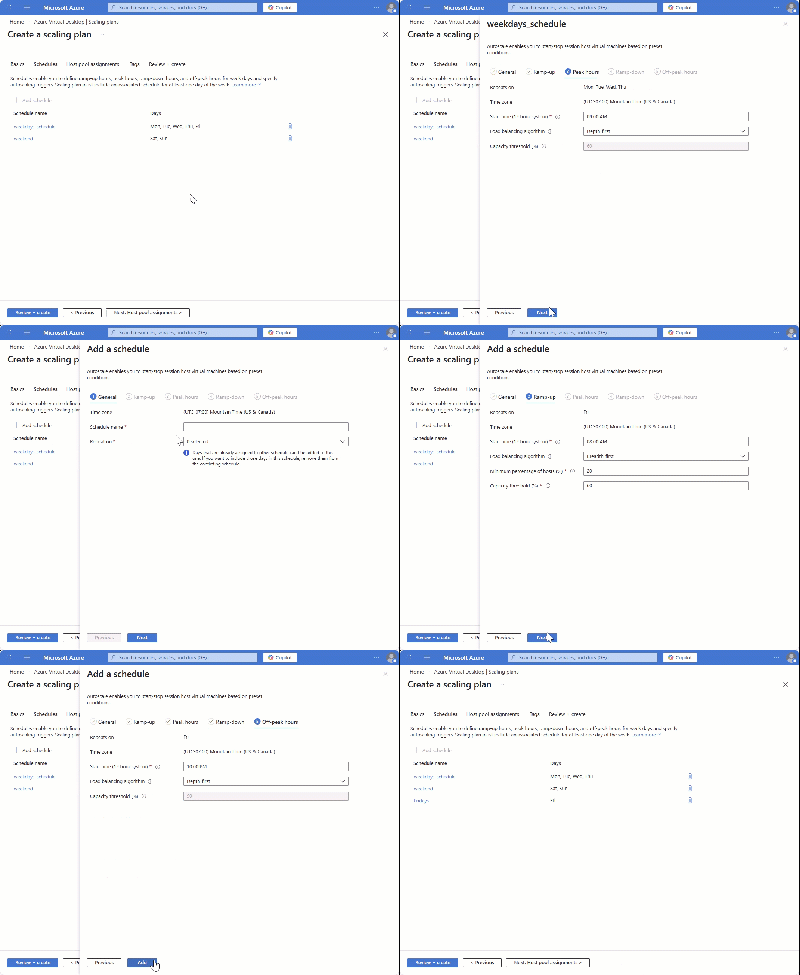
For example, if we wanted to do a similar change in the native Azure scaling plan we need to edit the schedule, remove Friday from the weekdays_schedule, go through the wizard, create a new schedule, modify the ramp down time and save this new schedule.
In total, the least number of clicks is 18 for applying the same change to an Azure scaling plan — and that’s only modifying the schedule! This doesn’t include the rest of the wizard for the scaling plan.
ControlUp DaaS IQ can allow for unique schedules and scaling structures. For example, if you work for an organization where there is a ‘lunch time dip’ of utilization, applying a ‘lunch time’ policy in ControlUp DaaS IQ is trivial. With Azure scaling plans or other products you cannot apply a dedicated intra-day lunch time policy.
Metric-based triggers (CPU + Memory + Session simultaneously).
ControlUp DaaS IQ can elastically power on and off machines based on metric-based demand.
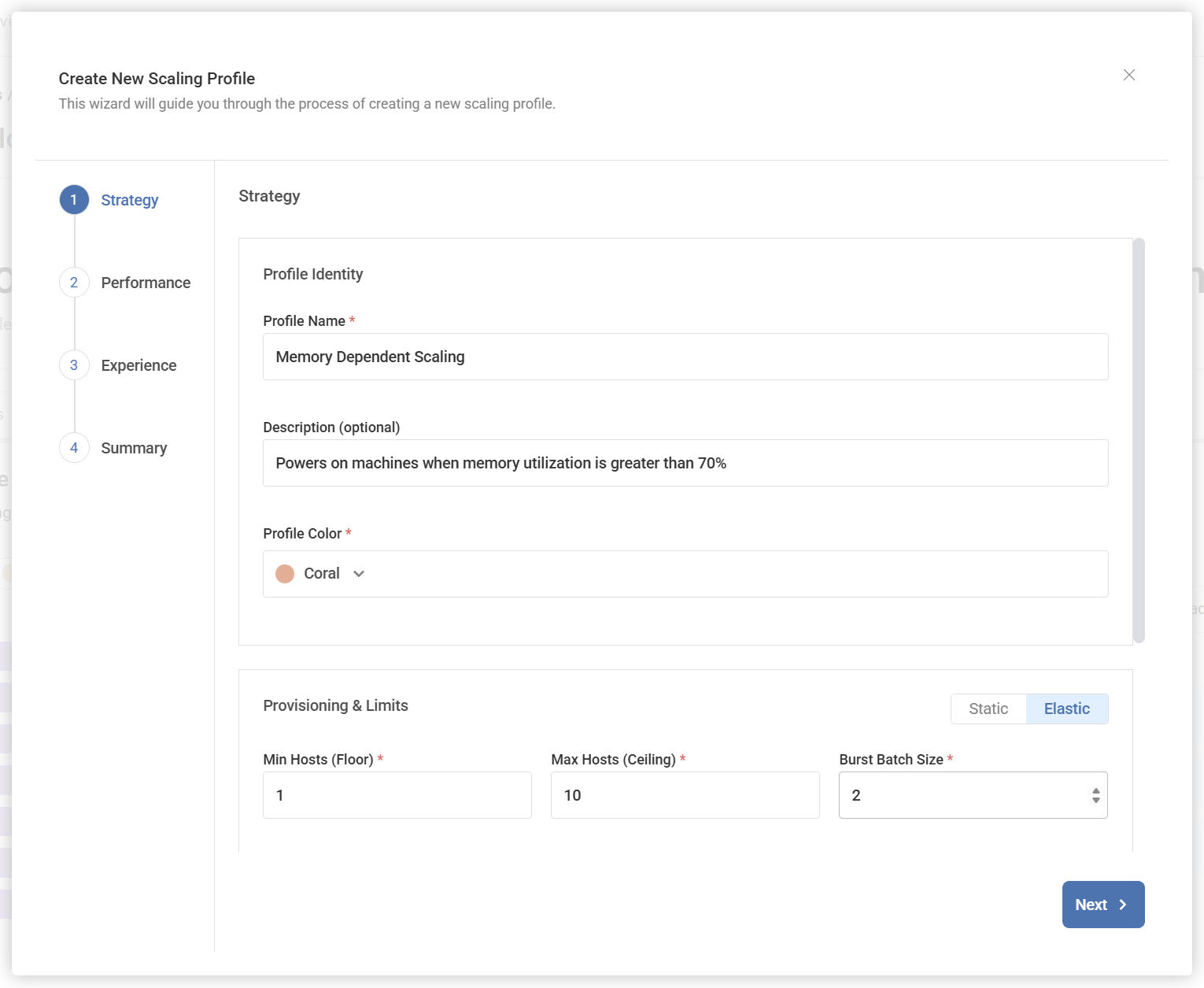
When configuring a new scaling profile, select “Elastic” and the parameters you want for the power on/off operations to take effect when executing the scaling logic. In this screenshot we are going to keep a minimum of 1 session host available with a maximum of 10 session hosts. When a scaling operation occurs it will occur with a maximum batch size of 2 session hosts. Selecting “Next” gets us to the Performance metrics we can configure for this elastic provisioning policy.

Thoughtfully designed scale-out/scale-in logic
It’s important to understand the scale-out and scale-in triggers operate differently. Scale-out (eg, power on machines) errs on the side of performance. Scale-in (eg, power off machines) errs on the side of caution. This logic is thoughtful for what admins are trying to achieve with power scaling. When scaling-out it’s better to have hosts available and when scaling-in it’s better to ensure we’re not powering off machines where users are still being productive.
This is achieved by using a different formula for the different scaling mechanisms.
For Scale Out the thresholds are OR statements. In this example, Scale Out works by evaluating this logic:
Scale Out: CPU > 80% OR Memory > 70% OR Free Sessions < 5
If CPU is greater than 80% OR if memory is greater than 70% OR if the number of free sessions is less than 5 — a scale out operation will take place.
For Scale In the thresholds are AND statements. In this example, Scale In works by evaluating this logic:
Scale In: CPU < 30% AND Memory < 50% AND Excess Free Sessions > 5
If CPU is less than 30% AND memory utilization is less than 50% AND the number of free sessions is greater than 5.
To put it succinctly, for Scaling Out, if ANY of the thresholds are met then a scale-out operation occurs. For Scaling In, ALL thresholds must be met for a scale-in operation to occur.
Stabilization window / cooldown
When looking at metrics there needs to be consideration for how long something should be in a specific state before acting upon it. Different activity that occurs on the session hosts can make it appear as if an action needs to be taken — but reality is this is a blip and we just need to give it some time to settle.
For example, spinning up multiple machines may cause the CPU and Memory averages of the host pool to drop significantly until users get onto the hosts and start consuming resources. The stabilization window will pause metric checking until the time configured has elapsed. Without the stabilization window, machines that are freshly powered on could be powered off back because the utilization metrics may drop due to the increase in capacity.
Shared, reusable policies across multiple host pools
Managing Azure Virtual Desktop at scale has traditionally meant maintaining hundreds of individually configured host pools with no coherent structure tying them together, leading to configuration drift and the painful reality of applying the same change dozens of times across your environment. ControlUp DaaS IQ solves this with a shared policy library: define a scaling policy once (CPU thresholds, memory triggers, grace periods, etc) and apply it across any number of host pools simultaneously. An MSP standardizing across 40 customer tenants, an enterprise aligning multiple business units, or a global organization keeping performance parameters consistent across regions can all accomplish this with a single policy definition.
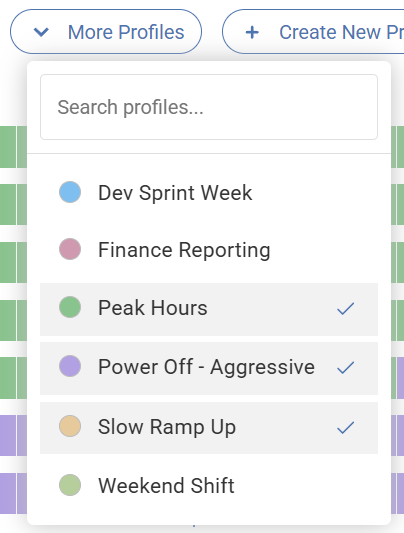
The operational leverage this creates is significant. When a scaling parameter needs updating, that change is made once and propagates immediately to every host pool using that policy. Policy names become self-documenting: an administrator sees “MSP Standard Peak” on any host pool’s scheduler and immediately understands the intent, rather than deciphering a collection of anonymous threshold values with no recorded rationale.
Standardization doesn’t mean inflexibility. Individual host pools can diverge from the shared baseline exactly where their requirements demand it, without touching anything else. A call center pool gets an aggressive burst variant. A Finance team temporarily switches to a higher-capacity month-end policy for three days then flips back. A Singapore office with a genuine mid-day utilization dip gets a custom lunch-hour policy inserted directly into its scheduler, something that isn’t even possible in native AVD’s four-phase model, while every other pool continues running the shared baseline untouched.
To configure holiday scaling policies without having to manually configure holidays
One of the smarter cost-control features in ControlUp DaaS IQ is Smart Minimums (Cost Assurance).

Instead of forcing admins to build and maintain separate holiday schedules just to avoid wasting money on quiet days, Smart Minimums lets a power policy respond to what is actually happening in the environment. Smart Minimums uses the active session count divided by the total session capacity for the Utilization value.
If Utilization stays below the defined threshold for the set period of time, DaaS IQ can temporarily ignore the normal minimum-host rule and scale the pool down to a lower host count. That makes it a practical answer for holidays, empty shifts, and other low-demand periods where you do not want capacity sitting there simply because the schedule says it should.
What I like about Smart Minimums is that it is not an all-or-nothing setting.
Smart Minimums can be enabled per power policy, so you can be selective about where it applies. For example, you might leave it disabled for an Off-Peak policy that is already intentionally conservative, but enable it for Peak Hours so the environment can still power down machines when utilization never materializes over a given window. That gives admins much tighter control than traditional schedule-only approaches: you still define the capacity posture you want, but DaaS IQ adds a safeguard that prevents overprovisioning when real-world demand does not match the calendar. It is a good example of ControlUp making autoscaling more adaptive, more cost-aware, and a lot less dependent on manual holiday-by-holiday administration.
At the end of the day
At the end of the day, AVD power scaling should not feel like an exercise in working around the platform. It should be easy to understand, easy to change, and flexible enough to reflect how people actually work.
That is really the story here.
Other solutions can get the job done, but they tend to be rigid, schedule-heavy, and leave too much administrative effort on the table. ControlUp DaaS IQ takes a very different approach: better scheduling, metric-based decision making, thoughtful scale-in and scale-out logic, reusable policies, and practical safeguards like Smart Minimums that help environments stay efficient even when the calendar and real-world demand do not line up.
For me, that is the real differentiator.
This is not just about adding more knobs and dials to autoscaling.
It is about making autoscaling behave the way admins have wanted it to behave for years: predictable, adaptable, and far less painful to manage at scale. If you are comparing ControlUp DaaS IQ against native Azure scaling plans or other products in this space, that is the lens I would use. Not just whether it can scale, but whether it can scale in a way that is operationally sane. And on that front, DaaS IQ looks a lot more like what modern AVD autoscaling should have been from the start.