

The latest update to the ControlUp platform introduces several new features designed to streamline remote troubleshooting and enhance the user experience for IT professionals. The updates focus on improving flexibility, efficiency, and cross-platform compatibility.
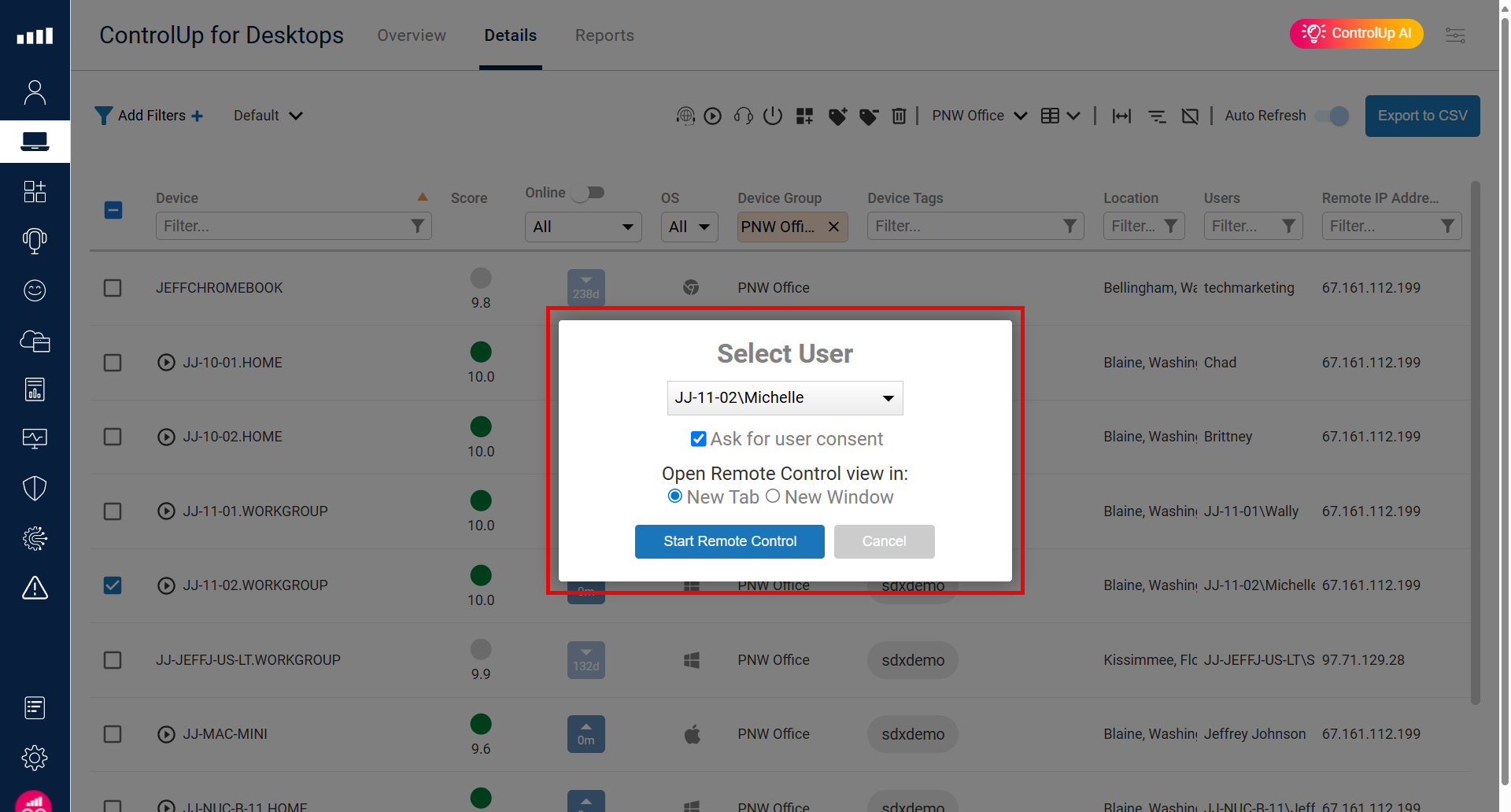
The new Remote Control View in New Tab or Window allows IT teams to multitask seamlessly, navigating between a user’s remote session and other critical metrics within the ControlUp console. Additionally, a redesigned user interface (UI) for the Remote Control feature provides a cleaner, more intuitive experience, placing essential tools and commands within a single, convenient drop-down menu. These improvements, combined with new support for ChromeOS devices, demonstrate our commitment to delivering a comprehensive and unified solution for managing diverse IT environments.
Remote Control View in New Tab or Window
With the new Remote Control View in New Tab or Window, IT support gets greater flexibility and control when troubleshooting remote sessions. Instead of being confined to a single view within the ControlUp console, you can now open a remote session in a separate browser tab or an entirely new window.
The Benefits of a Separate View
This seemingly small change offers significant benefits for IT support teams:
- Enhanced Multitasking: By opening a remote session in a new window, you can Alt-Tab between the remote desktop and the main ControlUp console. This allows for seamless transitions, whether you need to check monitoring metrics, review device details, or access other parts of the platform while actively assisting a user.
- Improved Workflow and Efficiency: A separate view enables a more efficient workflow. For example, a technician can have a user’s remote session open in one window while simultaneously viewing a dashboard of performance metrics in the ControlUp console on the same or a different monitor. This makes it easier to diagnose issues in real-time.
- Greater Control and Compliance: The ability to isolate the remote session view in a new window can also help with compliance and data security. It allows for a more focused and controlled support environment, ensuring that the technician’s attention is solely on the remote session when needed. This can be particularly useful in regulated industries where maintaining a clear separation of tasks is crucial.
This new feature empowers IT professionals to work more effectively, providing them with the tools they need to streamline remote support without compromising on visibility or control. It’s another way ControlUp is helping to streamline IT operations and improve the end-user experience.
Remote Control new User Interface
We’ve redesigned the ControlUp Remote Control user interface to be cleaner, faster, and more intuitive. Now, in addition to the ability to open your remote session in a new tab or window, you’ll notice a fresh, streamlined look that puts the most critical tools right at your fingertips.
The first thing you’ll see is a sleek blue top bar. This isn’t just a cosmetic change; it’s a functional hub for all the essential actions you need during a remote session. Gone are the cluttered menus and hidden buttons. The new design organizes everything neatly into a convenient drop-down menu, making it easy to find what you need without a second thought.
Within this menu, you’ll have one-click access to a range of powerful features, including:
- Clipboard Management: Quickly access the clipboard and seamlessly paste content to and from the remote machine.
- Keystroke Commands: Execute critical commands like CTRL + ALT + DEL and Paste Clipboard as Keystrokes with a single click.
- Elevated Actions: Launch an Elevated CMD (Command Prompt) directly from the menu, allowing you to perform administrative tasks without interruption.
- File Transfer: Effortlessly transfer files and folders between your machine and the remote device.
- Quick Actions: Take a screenshot of the remote session or zoom in and out to get a closer look at the screen.
This new UI is designed to minimize distractions and maximize your efficiency. The goal is to streamline remote support, so you can spend less time navigating the interface and more time solving problems.

Remote Control Support for ChromeOS
ControlUp Remote Control is designed to provide a consistent and powerful remote support experience across your entire device fleet. Whether your users are on a Windows desktop, a Mac laptop, or a Linux workstation, ControlUp offers a seamless, one-click solution to start a remote session. This is made possible by the lightweight ControlUp agent, which is installed directly on the Windows, macOS, and Linux devices.
ChromeOS devices, with their unique architecture and security model, do not allow for the installation of third-party software agents in the same way. To address this, ControlUp has developed a specialized solution that integrates directly with the Google Admin Console. To initiate a remote control session to a ChromeOS device, ControlUp leverages the built-in remote access capabilities managed by Google. This means that instead of a direct agent-to-console connection, ControlUp makes a call to launch a remote control session from the Google Admin website.
This approach offers two key advantages:
- Security and Compliance: It respects the inherent security of the ChromeOS platform, ensuring all remote sessions are conducted through Google’s trusted and managed infrastructure.
- Simplified Management: IT teams can continue to use their existing Google Admin Console credentials and policies to manage remote access, ensuring a consistent and secure workflow.
This seamless integration allows you to maintain a high level of control and visibility over your ChromeOS devices, providing a unified management experience across all your endpoints, regardless of their operating system.

Ready to see the difference for yourself? Try a self-guided demo and take your IT support to the next level.
Learn more:
- Assessing Your Remote Workers Network Performance
- Simplify Remote User Support
- Real-Life Remote Work Problems & How ControlUp for Desktops Can Help You Fix Them
