ControlUp offre un ensemble riche de capacités pour améliorer l'expérience numérique des employés qui utilisent n'importe quel bureau, n'importe quelle application, n'importe où.
Pulse AI analyzes real-time patterns across endpoints, apps, networks, and users. It suppresses expected activity to detect and alert only what matters.
Monitor, troubleshoot, and optimize every virtual desktop before slow sessions and app crashes interrupt your workforce.
ControlUp pour les ordinateurs de bureauStay in control of every device. Prevent desktop issues before they disrupt employees or flood your IT queue.
ControlUp pour la conformitéAutomate endpoint compliance across every device. Close security gaps and enforce policies without slowing IT down or getting in the way.
Pinpoint and fix SaaS and web app issues fast with real-time visibility across every device, browser, and network before employees feel the impact.
ControlUp Migrate pour Windows 365Migrate faster with less risk. Automated workflows replace manual steps, so your move to Cloud PCs is done right.
ControlUp DaaS IQIntelligent autoscaling and cost control for Azure Virtual Desktop environments.
Smarter root cause analysis, automated remediation, and AI-powered diagnostics. Fix issues faster across every device and app.
Rattrapage et remise en étatDeploy patches and remediate vulnerabilities across every endpoint, automatically and at scale. Stay secure without overwhelming IT.
Atténuation des risques liés aux points finauxSpot, prioritize, and remediate risks automatically. Keep endpoints secure and compliant without slowing desktop teams down.
Gestion à distance en directReal-time endpoint telemetry and silent remote remediation. See and fix issues the moment they happen, without disrupting the employee.
Proactively prevent issues and resolve tickets faster wherever hybrid workers are, whatever device they’re on.
Opérations informatiques autonomesShift IT from reactive to autonomous. Automatically detect, remediate, and prevent issues across your entire estate.
Augmenter l'efficacité des technologies de l'informationDo more with less. One platform to centralize visibility, streamline operations, and free IT to focus on what actually matters.
Optimisation des coûts informatiquesRight-size VDI, reclaim unused licenses, and make smarter device refresh decisions backed by real usage data and performance metrics.
Découvrez du contenu, des outils et des idées pour simplifier l'informatique et améliorer l'expérience numérique des employés.
Une organisation mondiale de professionnels de la technologie qui transforme le marché de la surveillance des postes de travail.
ControlUp offre un ensemble riche de capacités pour améliorer l'expérience numérique des employés qui utilisent n'importe quel bureau, n'importe quelle application, n'importe où.
Pulse AI analyzes real-time patterns across endpoints, apps, networks, and users. It suppresses expected activity to detect and alert only what matters.
Monitor, troubleshoot, and optimize every virtual desktop before slow sessions and app crashes interrupt your workforce.
ControlUp pour les ordinateurs de bureauStay in control of every device. Prevent desktop issues before they disrupt employees or flood your IT queue.
ControlUp pour la conformitéAutomate endpoint compliance across every device. Close security gaps and enforce policies without slowing IT down or getting in the way.
Pinpoint and fix SaaS and web app issues fast with real-time visibility across every device, browser, and network before employees feel the impact.
ControlUp Migrate pour Windows 365Migrate faster with less risk. Automated workflows replace manual steps, so your move to Cloud PCs is done right.
ControlUp DaaS IQIntelligent autoscaling and cost control for Azure Virtual Desktop environments.
Smarter root cause analysis, automated remediation, and AI-powered diagnostics. Fix issues faster across every device and app.
Rattrapage et remise en étatDeploy patches and remediate vulnerabilities across every endpoint, automatically and at scale. Stay secure without overwhelming IT.
Atténuation des risques liés aux points finauxSpot, prioritize, and remediate risks automatically. Keep endpoints secure and compliant without slowing desktop teams down.
Gestion à distance en directReal-time endpoint telemetry and silent remote remediation. See and fix issues the moment they happen, without disrupting the employee.
Proactively prevent issues and resolve tickets faster wherever hybrid workers are, whatever device they’re on.
Opérations informatiques autonomesShift IT from reactive to autonomous. Automatically detect, remediate, and prevent issues across your entire estate.
Augmenter l'efficacité des technologies de l'informationDo more with less. One platform to centralize visibility, streamline operations, and free IT to focus on what actually matters.
Optimisation des coûts informatiquesRight-size VDI, reclaim unused licenses, and make smarter device refresh decisions backed by real usage data and performance metrics.
Découvrez du contenu, des outils et des idées pour simplifier l'informatique et améliorer l'expérience numérique des employés.
Une organisation mondiale de professionnels de la technologie qui transforme le marché de la surveillance des postes de travail.
Microsoft has made it clear: VBScript is on its way out.
With the introduction of new telemetry in Windows, organizations can now
see when VBScript is still being used in their environment. That’s a big deal—
because most environments still have hidden dependencies on legacy scripts,
often buried in logon scripts, scheduled tasks, or old applications.
The challenge isn’t whether VBScript is used. The challenge is: where, how often, and by what process?
That’s exactly where this solution comes in.
VBScript has been around for decades, powering everything from simple automation to critical business workflows. But as Microsoft moves toward deprecating it, relying on VBScript becomes a risk:
Without insight, you’re flying blind.
This event is triggered whenever VBScript is executed on a system.
We built a ControlUp script that:
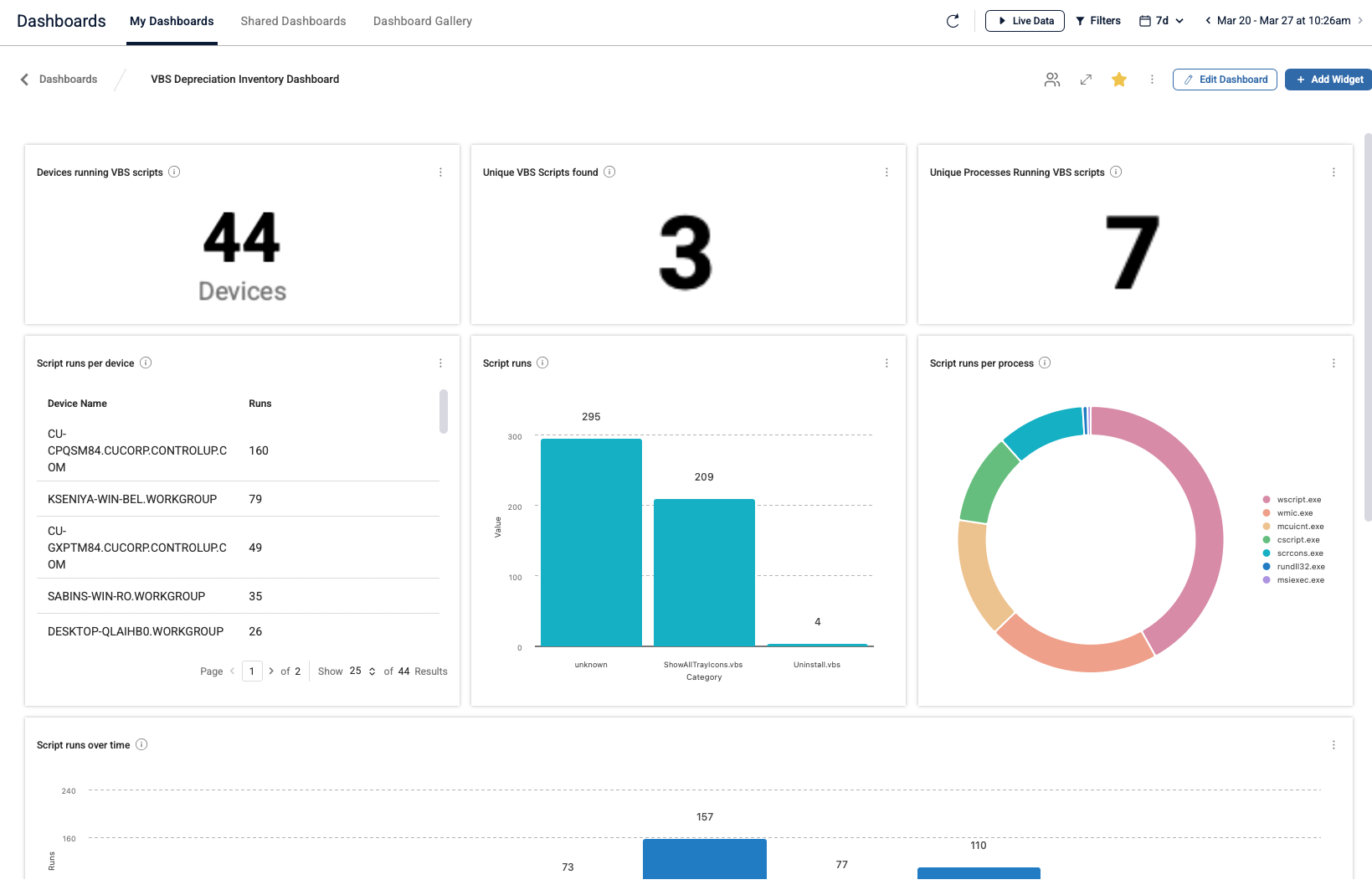
This data is then sent into a custom index and visualized in a dashboard.
This transforms a vague risk into something measurable and actionable.

To start collecting data for this dashboard:
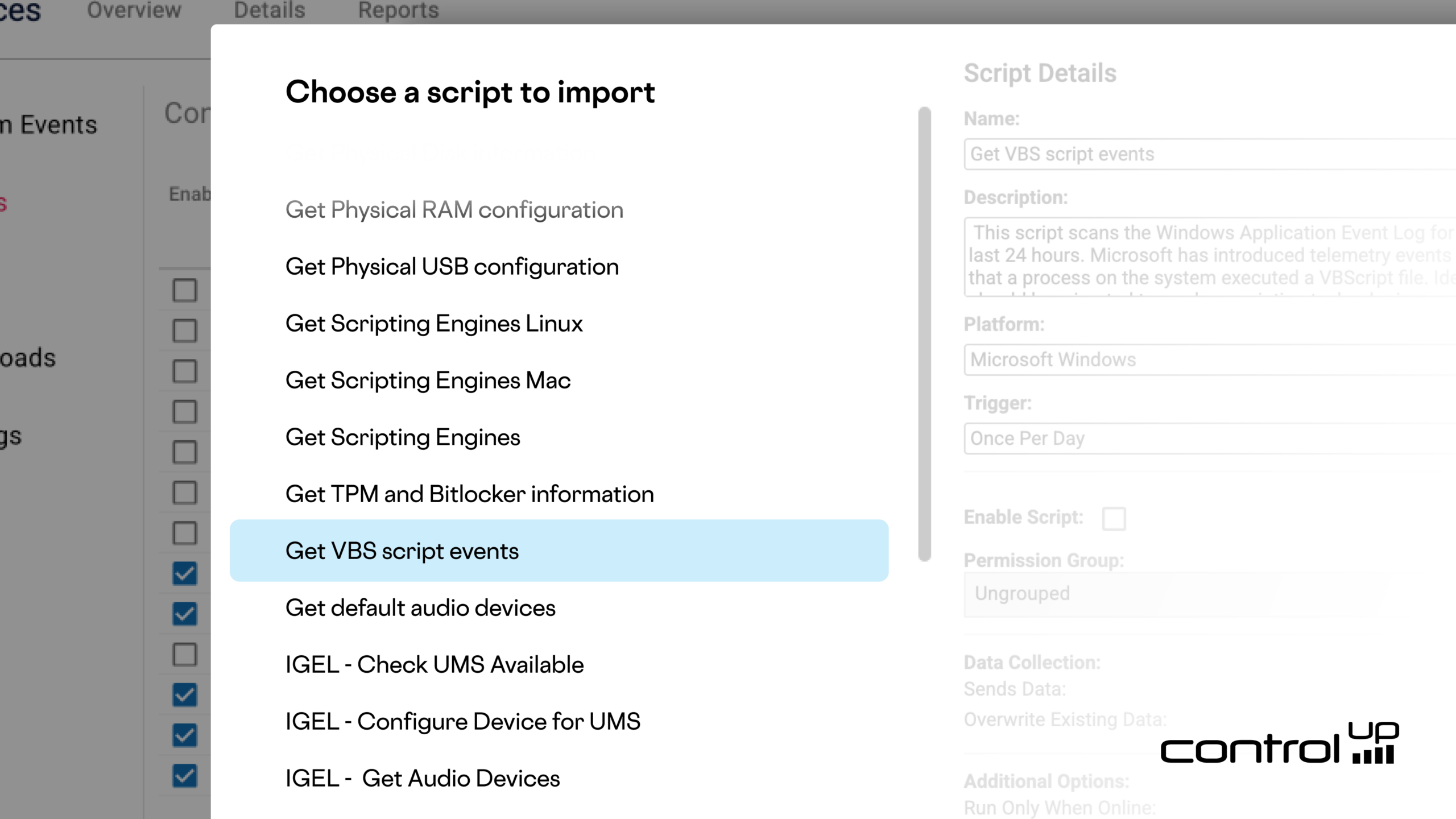
Go to
Devices → Scripts → Script Library
and import the script:
“Get VBS Script Events”
The script runs safely in the background and only reports data—no changes are made to the system.
Within minutes, you’ll start building a clear picture of VBScript usage across your environment.
Then in the dashboards gallery you will find the “VBS Depreciation Inventory Dashboard” to visualize the results.