
 Mallory Miller
 ControlUp's Digital Employee Experience (DEX) platform offers IT professionals a consolidated solution to manage, troubleshoot, and optimize digital environments, aiming to reduce tool sprawl and improve operational efficiency.
The platform integrates functionalities from numerous common IT tools, such as remote assistance, vendor-specific diagnostics, survey tools, network monitoring, and automation, thereby streamlining operations.
By centralizing these capabilities, ControlUp enables IT teams to speed up issue resolution, enhance proactive monitoring, and achieve significant cost savings by reducing the reliance on multiple specialized applications.
The ultimate conclusion is that this integrated approach simplifies the IT tech stack, minimizes training requirements, and boosts employee productivity through a unified strategy for managing the digital employee experience.
IT pros need numerous tools to perform daily tasks. You need tools to view, control, and troubleshoot device and app issues. You also need tools to fix network problems, tools for unified communications issues, and survey tools to ensure continuous improvement and employee satisfaction. Not to mention that IT also uses many of the same tools as others in the organization, like search engines and spreadsheets, to manage, plan, and execute various projects.
Phew—that’s A LOT.
Don’t worry—ControlUp has you covered! Our digital employee experience (DEX) platform helps streamline work, speed resolution, and save money by delivering many valuable IT capabilities all in one platform. In this blog, we will discuss 10 common tools that our customers have been able to consolidate after they implemented ControlUp.
DEX Platforms: Enabling IT Tool Consolidation
The rich feature set of DEX tools, like ControlUp ONE, provides an opportunity for IT to consolidate tools and streamline operations for greater efficiency and ROI. Examples of tools that DEX platforms can consolidate include:
- Remote Assistance Tools
- Vendor Tools
- Survey Tools
- Search Engines and Third-Party Chatbots
- Network Tools
- Patch Management Tools
- Spreadsheets
- Operating System Tools
- Application Troubleshooting Tools
- Automation Tools
1. Remote Assistance Tools
What they do: These tools allow IT teams to access and control devices when troubleshooting or supporting users remotely.
ControlUp features: The ControlUp ONE DEX platform includes robust remote IT support software features, allowing IT support to shadow or control any desktop remotely. You can see issues in real time from the employee’s perspective, streamlining troubleshooting and improving ticket resolution times.
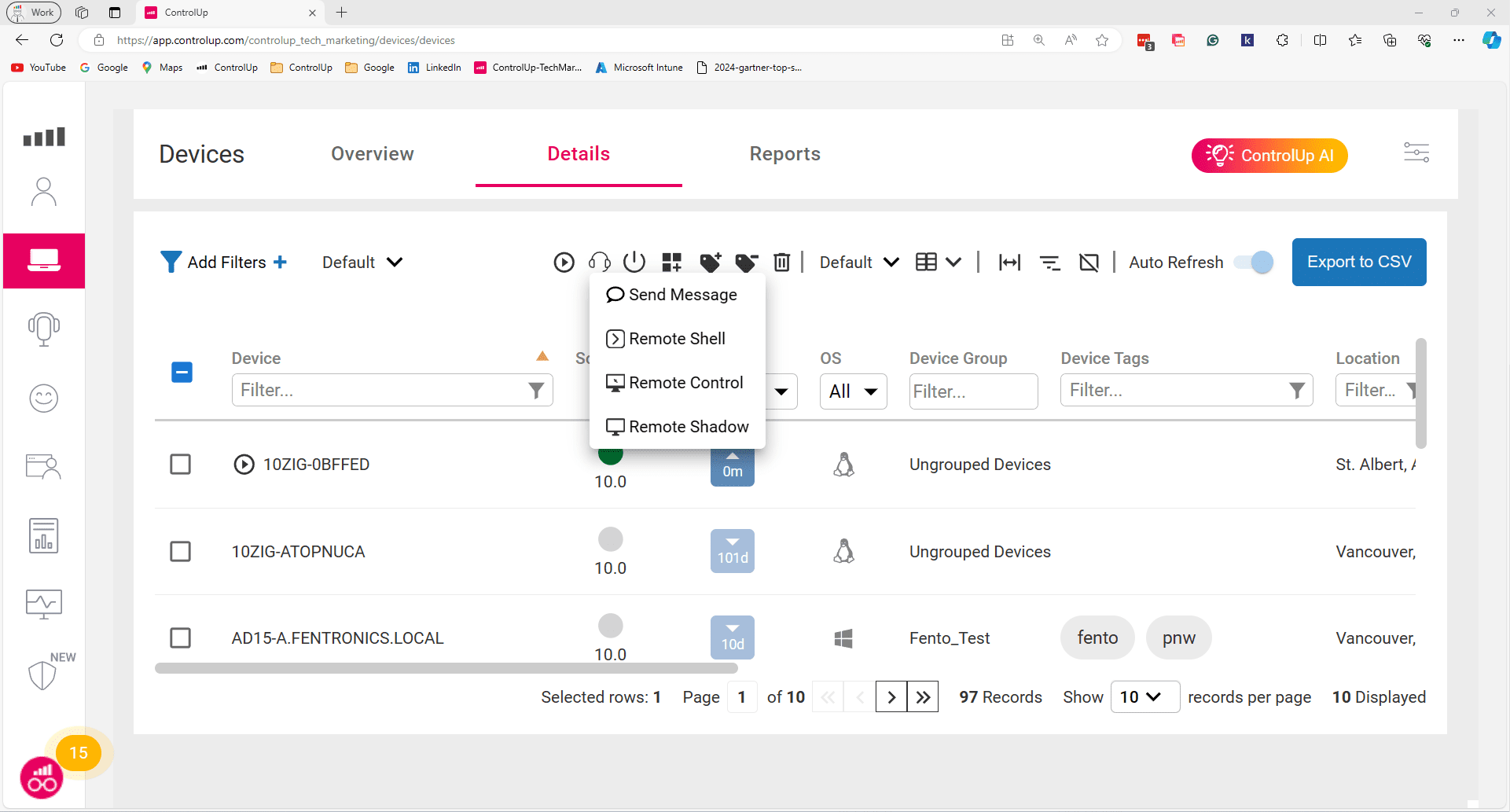
The ControlUp web console provides powerful remote management features, allowing you to quickly access and troubleshoot devices directly from your browser.
2. Vendor Tools
What they do: These specialized tools are provided by vendors for specific platforms or software and offer in-depth data and control tailored to the vendor’s ecosystem.
ControlUp features:
3. Survey Tools
What they do: Survey tools collect feedback from employees on IT services, device performance, or support satisfaction.
ControlUp features: Employee surveys provide valuable insights into the digital experience and sentiment beyond performance metrics. Control Up has built-in surveys that can be sent to all employees or triggered by a computer event. You can specify who receives a survey, when, and the survey language. You then get a complete breakdown of responses, surveys sent, and even NPS scores to better understand and address issues with employee sentiment, ultimately improving the end-user experience monitoring.
4. Search Engines and Chatbots
What they do: Search engines and AI chatbots help IT find information about issue resolution and prevention, but they have no visibility into what’s actually happening in your environment.
ControlUp features:Pulse AI Assistant (launched in January 2026) lets IT ask a question in plain language instead of digging through consoles or writing ad-hoc queries. It correlates live signals across endpoints, sessions, applications, networks, and tickets, then explains what’s happening, why, and the specific remote action to run next. Pulse Assistant also answers plain-language questions against ControlUp’s own knowledge base, so IT gets fast, accurate how-to guidance without leaving the console.
5. Network Tools
What they do: Networking tools help IT teams monitor, manage, and optimize network performance, security, and connectivity to ensure reliable and efficient communication.
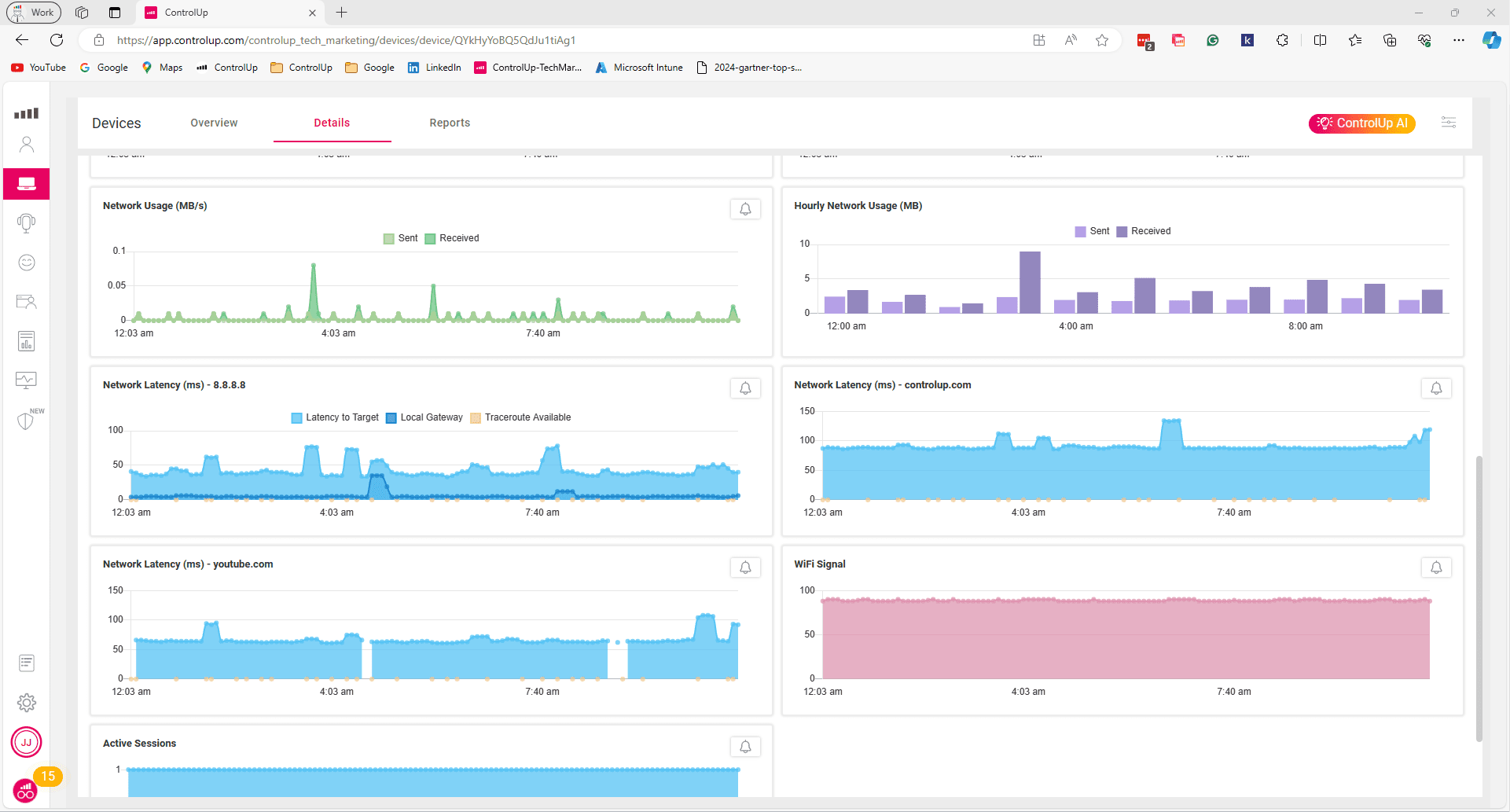
ControlUp features: While ControlUp will not replace some of the specialized tools the networking team might use, the platform can resolve quite a few issues with Level 1 support and prevent escalations. ControlUp captures metrics from networks like home offices and coffee shops. It provides actionable insights into usage, latency, VDI/DaaS connections, and Wi-Fi signal strength, acting as powerful network troubleshooting tools to ensure employees can stay productive wherever they work.
6. Patch Management Tools
What it does: These tools manage and automate software updates and patches to improve security and functionality.
ControlUp features: ControlUp enables IT teams to quickly deploy software patches, fix issues, and improve future remediation. It also continuously checks your environment to identify vulnerabilities, outdated patches, and weak configurations that expose your organization to cyber threats. IT saves time with autonomous or ad hoc issue remediation and can better understand the success of remediations with reports on progress and effectiveness.
Learn more about Patching and Vulnerability Management with ControlUp.
7. Spreadsheets
What they do: Traditional spreadsheets and planning tools are used for data analysis, calculations, and creating dashboards. They track important IT metrics, budgets, and facilitate strategic planning.
ControlUp features: ControlUp’s intuitive dashboards reduce the need to manually create reports, improving scalability for large data sets. You can easily view sizing and cost recommendations for VDI and DaaS environments, information about app and tool licenses and usage, and get full visibility into the Windows estate to help with migration planning. (And, for all the spreadsheet lovers out there, you can still export your data from Controlup!)
Learn more about IT Cost Optimization
8. Operating System Tools
What they do: These tools are built into the OS to help manage, monitor, and maintain device systems, helping IT ensure devices run smoothly.
ControlUp features: These tools are important for asset management and deployment, but do not provide troubleshooting guidance. ControlUp gathers performance data on metrics such as CPU, memory, and disk space. In addition, ControlUp collects information on active processes, stopped processes, services, and sessions. You then get actionable insights or can run scripts to troubleshoot issues and improve the digital employee experience.

9. Application Troubleshooting Tools
What they do: These tools help troubleshoot app problems, like long load times or crashes, to improve performance and productivity.
ControlUp features: ControlUp gathers important application metrics such as load time, performance, install base, and recent crashes. It also proactively informs IT about the applications that are giving employees the most problems. When a fix is discovered, the platform provides a way to remediate the problem ensuring employees stay productive on the tools they use.
10. Automation Tools
What they do: Myriad IT tools exist to automate many different IT workflows. They can streamline processes, reduce human error, and save time and money.
ControlUp features: ControlUp’s rich feature set can automate many manual processes, streamline workflows, and optimize the digital experience. With ControlUp, you can reduce ticket volume with autonomous self-healing, get better end-user feedback with automated surveys, and send alerts for system outages or slowness. The platform offers built-in automations and custom scripts, meaning there is no limit to the manual processes you can automate. And recent updates to ControlUp Workflows bring greater improvements to IT operations.
ControlUp Helps IT Thrive
Instead of juggling many different tools, ControlUp provides a single platform to address a range of digital experience issues. This integrated approach reduces tool sprawl, minimizes training requirements, and cuts down costs associated with managing multiple platforms. The built-in and customizable features empower IT to proactively monitor, troubleshoot, and optimize the end-user experience and simplify the tech stack to increase employee productivity and efficiency with proactive IT support.
Additional resources: