
For years, organizations have struggled with one of the most expensive and least optimized areas in IT: the lifecycle of laptops and desktops. Decisions about when to retire devices, when to extend them, and when to upgrade them have traditionally relied on a fixed refresh schedule. The problem is that a fixed refresh schedule ignores the realities of how devices actually perform in the hands of real users.
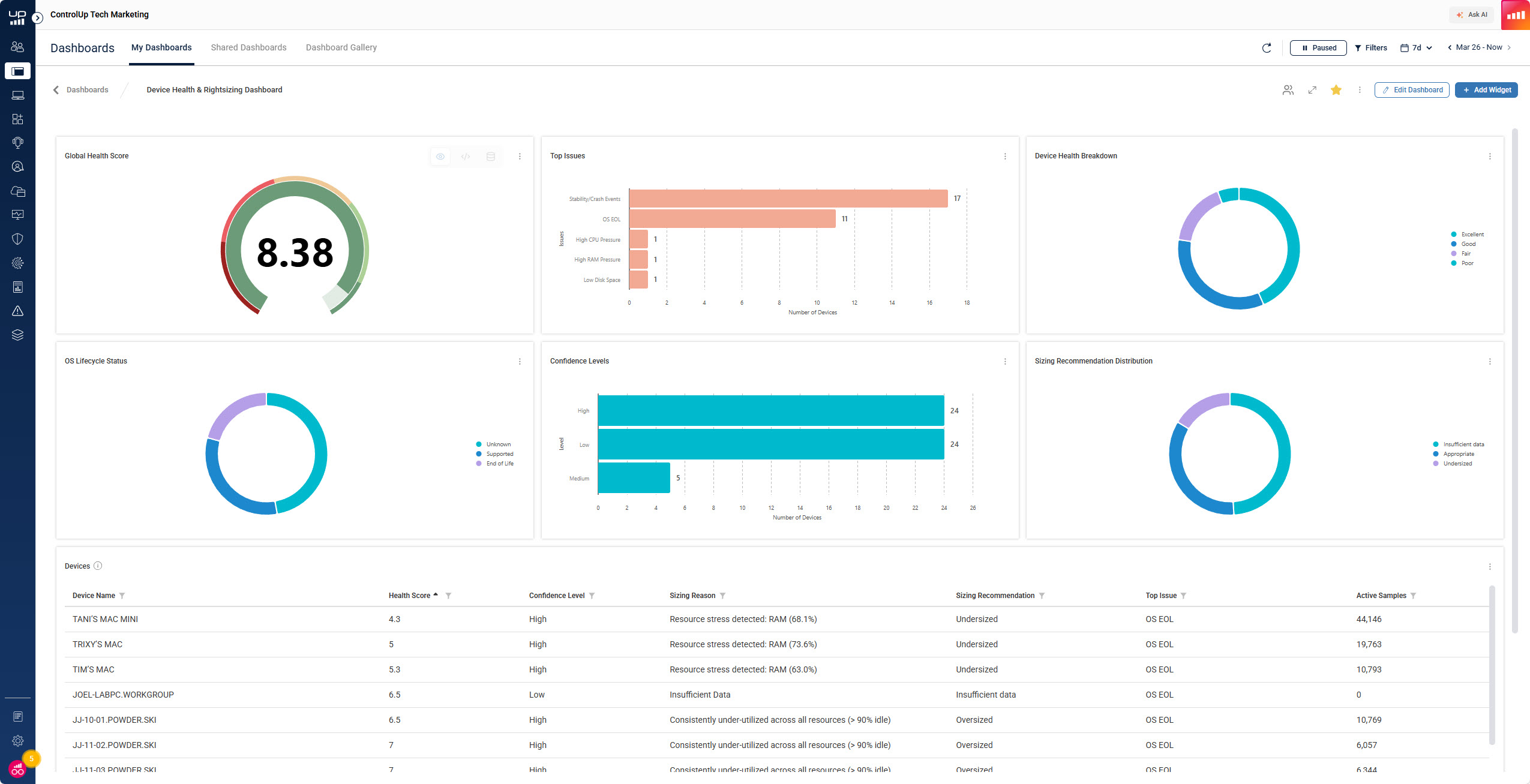
ControlUp’s Device Health and Rightsizing Dashboard introduces a device lifecycle management (DLM) capability for the enterprise. This solution delivers the data companies have always needed to make intelligent, financially responsible, and sustainable lifecycle decisions.
Finally, you have a way to understand which devices should live longer and which devices need to be retired early, based on unified, correlated data.
The Business Outlook: Extend Device Life to Reduce Cost and Improve Sustainability
From a business perspective, extending the life of laptops and desktops creates immediate financial and environmental benefits.
Extending device life provides:
- Lower capital expenditure because fewer new devices need to be purchased.
- Better sustainability with less electronic waste entering the ecosystem.
- Higher return on investment by spreading the initial cost over more years.
- A stable support environment because IT does not have to retrain staff on new hardware, drivers, or compatibility issues.
These advantages have made extended lifecycles extremely attractive to leadership teams. The problem is that extending device life creates hidden costs and risks that IT must absorb.
The IT Reality: Extending Lifecycles Increases Risk and Operational Cost
Although extending device lifespan sounds beneficial, IT teams face significant consequences when devices are kept past their ideal end of life.
Extending devices too long results in:
- Higher operational expense because older devices experience more downtime and require more support.
- Increased security exposure because aging hardware and operating systems eventually stop receiving security updates.
- Lower productivity because older devices struggle under modern operating systems and workloads.
- Unpredictable user issues caused by a mix of hardware failure, OS instability, battery degradation, and compatibility gaps.
These conflicting incentives have created one of the biggest lifecycle challenges in the industry.
The Real Problem: No One Has Been Able to Correlate the Right Data
Without correlation of hardware and user experience issues, IT cannot confidently decide whether a device is healthy enough to extend or risky enough to replace. Because of this lack of insight, organizations fall back to a fixed refresh date and replace devices regardless of condition. This means perfectly healthy devices are often retired early, while unhealthy devices continue in service far too long.
Companies have not had the ability to connect:
- User issues
- Hardware issues
- Operating system issues
- Battery performance
This is wasteful, expensive, and inefficient. It also prevents organizations from achieving sustainability and ROI goals.
This is exactly the problem the ControlUp Device Health and Rightsizing Dashboard solves.
The Answer: ControlUp Device Health and Rightsizing Dashboard
ControlUp’s solution provides the comprehensive data correlation required for true Device Lifecycle Management. It evaluates device health through five pillars and calculates a single health score from zero to ten that rightsizing, Stability, Battery Health, OS Lifecycle, and Storage Space. This unified scoring model is explained in the attached documentation.
Because ControlUp captures all relevant device telemetry, organizations can finally make accurate lifecycle decisions.
ControlUp provides:
- Clear evidence when a device should be retired because it creates too many issues.
- Clear evidence when a device is healthy enough to extend past its warranty.
- Clear evidence when a device is only held back by a simple battery replacement or RAM upgrade.
- Clear evidence about which device models should no longer be purchased.
- Clear evidence that supports a longer lifecycle strategy without compromising security or productivity
This is lifecycle management powered by actual data instead of assumptions.
Benefits: Data Driven Lifecycle Optimization Beyond Experience
The ControlUp DLM solution enables organizations to:
- Extend the life of healthy devices.
- Replace devices that consistently create issues.
- Achieve greater ROI across the entire fleet.
- Reduce both capital and operational expenditures.
- Improve sustainability through reduced e-waste and Green IT practices.
- Increase employee satisfaction and productivity by eliminating slow or unstable devices.
These outcomes have been impossible to achieve until now because organizations did not have access to the deep telemetry and correlation that ControlUp now delivers.
Five Strategic Options to Extend the Life of Devices
With accurate device health scoring, businesses can choose from several lifecycle strategies that were not practical before.
- Keep a Windows 10 device that performs well by purchasing Microsoft Extended Security Updates
Microsoft provides security updates for Microsoft 365 apps on Windows 10 until October 10, 2028, giving organizations more time to safely remain on Windows 10 as they transition. [learn.microsoft.com]
- Extend the life of a device by upgrading components
If a device is fundamentally healthy, IT can upgrade RAM or replace a degraded battery, then move the device from Windows 10 to Windows 11 with reliable performance.
- Replace the device with new hardware
If ControlUp scores indicate persistent failures or instability, replacement becomes an informed decision rather than guesswork.
- Repurpose older but healthy devices as VDI endpoints
Devices with solid metrics can run IGEL, Stratodesk, or similar thin client operating systems and continue providing value.
- Use Windows 10 for Windows 365 Cloud PC access with continued Microsoft support
Microsoft has extended free Microsoft 365 support for Windows 10 devices until 2028, allowing organizations to safely use Windows 10 devices as Cloud PC clients for an extended period. [squaredtech.co]
Many organizations are not aware of this option, and it can significantly extend the useful life of older devices.
ControlUp Delivers the Data That Modern Lifecycle Management Requires
Companies can no longer rely on age-based refresh cycles or incomplete monitoring tools. The risks are too high, the costs are too great, and the sustainability demands are too urgent. With the ControlUp Device Health and Rightsizing Dashboard, executives and IT leaders finally have the data needed to strike the right balance between cost savings, security, sustainability, performance, and user experience.
Better data leads to better lifecycle decisions. And better lifecycle decisions lead to a healthier business.
