

Enterprises face a dual AI governance challenge requiring both visibility into unapproved employee AI use ("shadow AI") and control over AI embedded within existing IT platforms.
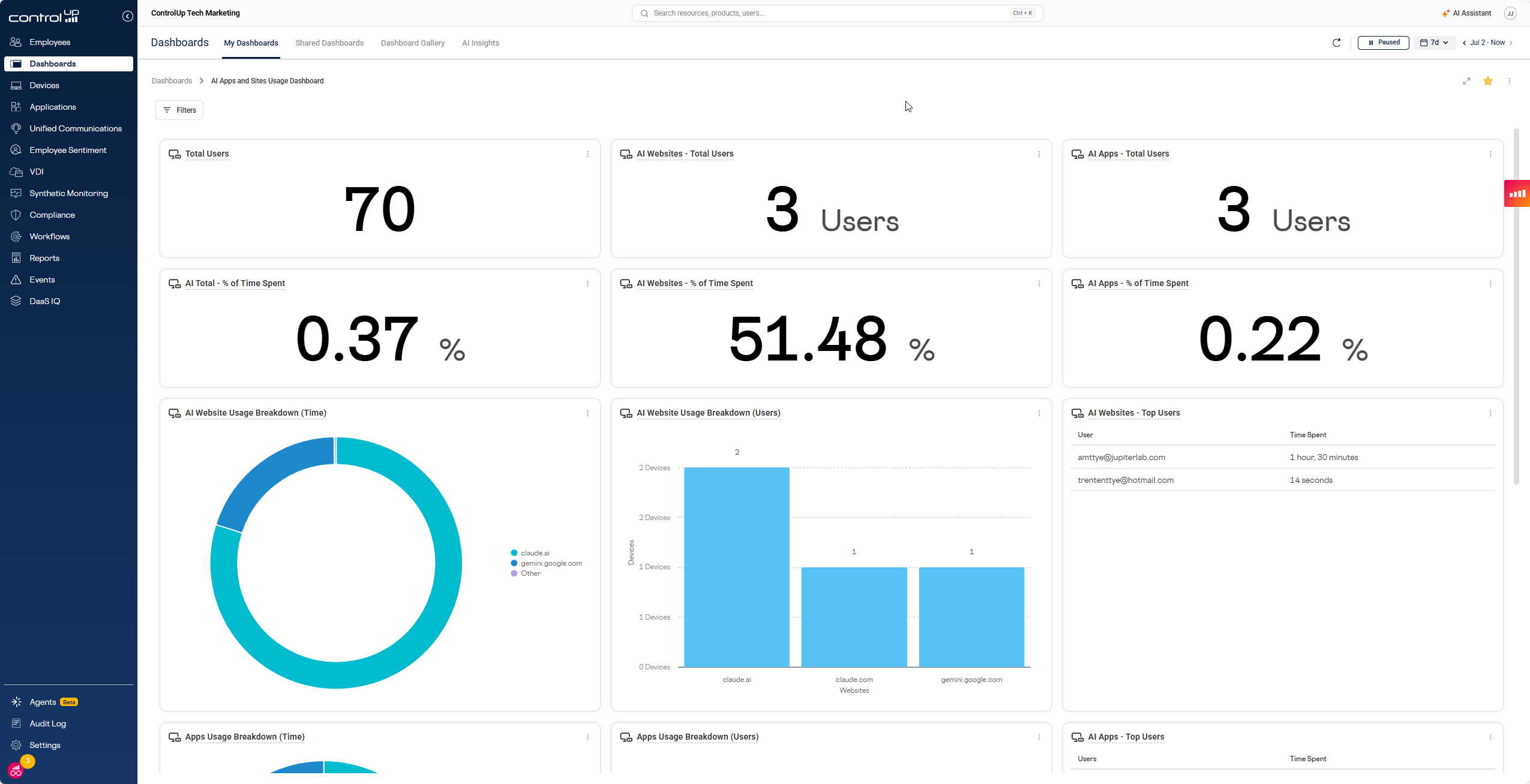
ControlUp's AI Usage Visibility provides IT with real-time insights into employee AI tool adoption, usage patterns, and license optimization.
Its Pulse AI features exemplify governance for embedded AI, ensuring actions are scoped by user permissions, require explicit approval, and are fully auditable.
Comprehensive AI governance is bidirectional, demanding IT oversight, control, and traceability across both employee-introduced and vendor-embedded AI solutions to maintain accountability.
AI showed up in the enterprise the way it shows up everywhere else: fast, unevenly, and mostly without asking permission. Employees started using ChatGPT, Copilot, and a dozen other tools before most IT teams had a policy, let alone a way to enforce one. At the same time, the platforms IT already relies on, including ControlUp, started building AI directly into their own products to investigate issues, flag anomalies, and resolve tickets automatically.
IT faces two distinct AI governance challenges. The first is visibility: understanding which AI tools employees use, whether those tools are approved, and whether paid licenses are going unused. The second is control: ensuring the AI embedded in your IT stack, including AI that recommends fixes and takes action on endpoints, operates within the boundaries you define. Both challenges now land squarely on the CIO and IT leadership team, even when the AI itself is introduced by business users, SaaS vendors, or autonomous workflows IT did not originally build. Addressing only one of these challenges does not deliver AI governance; it delivers only half of it.
The Visibility Problem: You Can’t Govern What You Can’t See
Most IT teams can tell you which AI tools they’ve licensed. Far fewer can tell you which AI tools their employees are using, how heavily, whether those tools can access corporate data, or whether the two lists match. That gap is where the real risk lives: IT is increasingly accountable for AI usage it may not own, approve, or even know exists.
ControlUp’s AI Usage Visibility gives IT a live picture of AI adoption across the organization; built from data you’re already collecting. It groups AI platforms like ChatGPT, Copilot, Claude, and Gemini into trackable App Groups, surfaces adoption trends and top tools, and flags newly detected AI platforms before they become a surprise six months into a compliance review.
That visibility answers three questions IT is increasingly being asked to have ready:
- Which AI tools are in use, and by whom? Not which ones were approved, which one’s people are using.
- Are we paying for AI seats nobody activates? Enterprise AI licenses go idle fast, and comparing licensed seats against real usage turns a vague renewal conversation into a data-backed one.
- Can we prove it if someone asks? A compliance report you can export in one click beats scrambling for an answer when the board, an auditor, or an incident-response team asks what AI the company runs on, who used it, and what evidence exists.
The next step, which ControlUp is building toward, is turning that visibility into an active governance workflow: auto-detecting new AI tools as they show up and letting IT move them from shadow to approved without blocking the people already relying on them. That capability isn’t live yet, but it’s the direction visibility is heading. Seeing the tools is step one. Deciding what to do about each one is step two. Being able to show the decision path later—what was detected, who approved it, and what policy applied—is what turns visibility into governance.
The Control Problem: Governing AI Already Inside Your Stack
The second half of AI governance doesn’t involve any tool your employees found on their own. It’s about the AI already embedded in the platforms IT depends on. This is where the conversation has moved beyond AI that simply answers questions. Enterprise IT leaders are now worrying about AI that recommends actions, calls tools, changes configurations, triggers workflows, and interacts with systems of record. ControlUp’s Pulse AI is a good example of what that governance needs to look like in practice, because it’s not one AI feature, it’s three, and each one needs its own rules.
Pulse Assist is the conversational layer, the part that can look at a problem and suggest a fix. The governance question here isn’t whether the AI is smart enough to suggest the right action, it’s whether it’s allowed to take that action at all. AI Assist checks every suggested action against the requesting user’s actual permissions before anything executes, so a Tier-1 support tech using AI Assist can’t do anything through the AI that they couldn’t already do manually. Nothing runs without explicit approval, and admins have to consent to activate AI Assist at the organization level before anyone can use it. That distinction matters because the risk changes when AI moves from advice to execution.
Anomaly Detection is the part of Pulse AI that decides what “normal” looks like and flags what isn’t. Left ungoverned, that’s exactly the kind of AI black box IT should be wary of. ControlUp’s approach keeps the humans in charge of the definition: admins set the scope, whether that’s the whole org, a device group, or a single machine, tune the sensitivity, and enable or disable rules per tenant. The AI does the pattern-matching. IT decides what counts as a pattern worth flagging.
Pulse Resolve is where governance matters most, because it’s the one component that puts AI-driven actions directly in front of end users. Resolve lets employees fix their own issues through guided AI actions, but every action it can run comes from a whitelist IT has already published and approved. An employee using Resolve can’t trigger anything an admin hasn’t explicitly signed off on, and any action that needs elevated rights is flagged and handled with the appropriate security prompt. In other words, the AI can guide the user toward action, but IT still defines the action catalog, the permission boundary, and the escalation path.
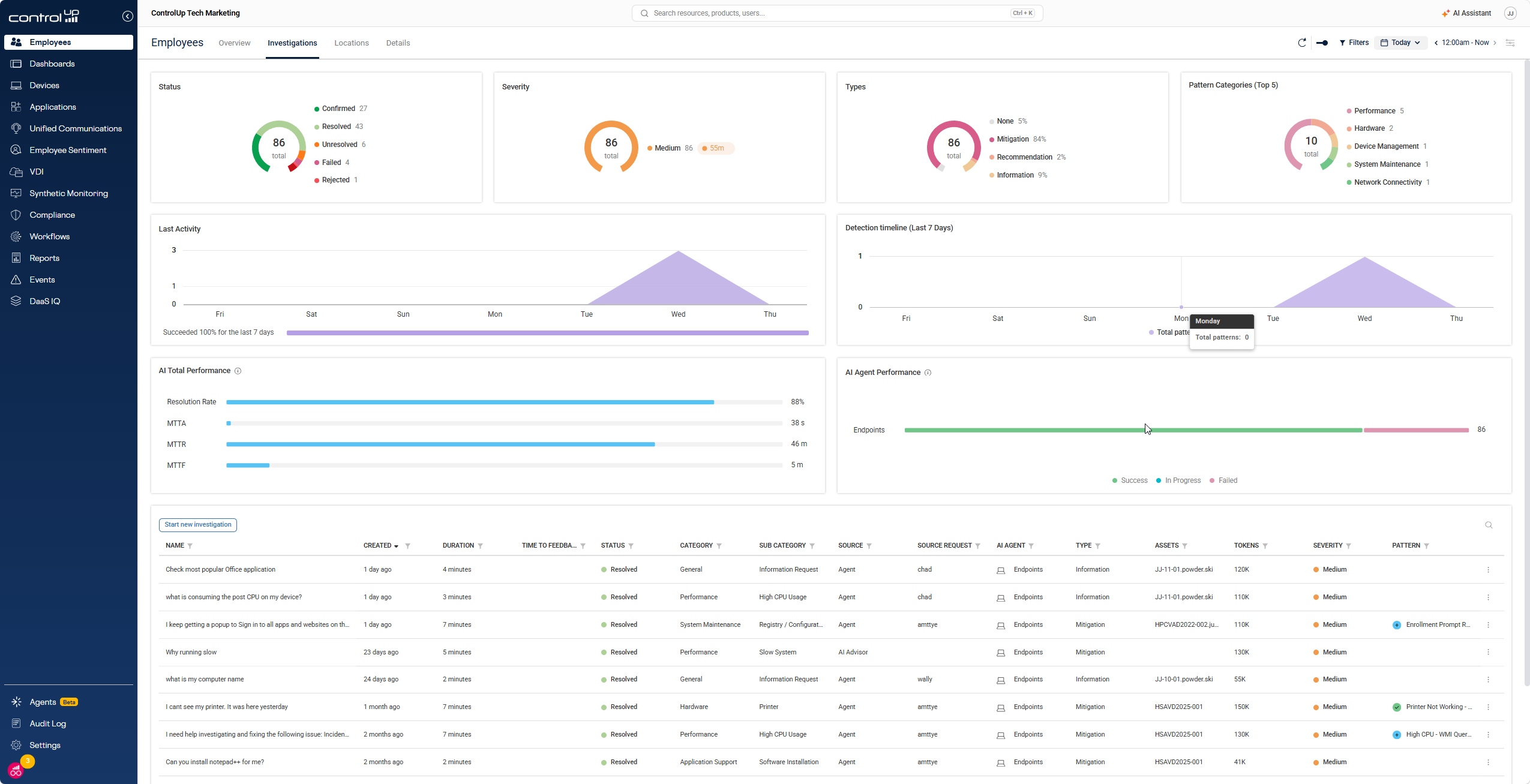
Across all three, the governance model comes down to the same idea: AI can suggest, detect, and guide, but every action it initiates is scoped by role, requires the right approval, and gets logged. Whether it’s AI Assist proposing a fix, Anomaly Detection firing an alert, or Resolve running a script, the record looks the same: who did what, when, what system was affected, what approval was required, and what happened next. That traceability is what makes governance defensible when the question comes from the board, the security team, or an auditor.
This is also why agentic AI changes the bar for governance. A chatbot that gives a bad answer creates one kind of risk. An AI system that can take action—restart a service, change a setting, run a script, open a ticket, or trigger a workflow—creates another. The right governance model does not treat every AI feature the same. It applies tighter controls as the AI gets closer to production systems, privileged access, and autonomous execution.
AI Governance Is Bidirectional
Shadow AI and embedded AI look like different problems because they show up differently. One is about tools your employees found on their own. The other is about tools your vendors built into the products you already trust. But the underlying question is identical: does IT have visibility, control, and evidence, or is AI making decisions nobody signed off on and nobody can reconstruct later?
A real AI governance strategy has to answer that question in both directions: for the AI your people bring in, for the AI your vendors embed, and for the AI agents that increasingly move from suggesting work to doing it. The goal is not to slow AI down. It is to make sure IT can see it, govern it, prove what happened, and keep accountability where it belongs.
