ControlUp offers a rich set of capabilities to improve the digital experience for employees using any desktop, any application, anywhere.
Pulse AI analyzes real-time patterns across endpoints, apps, networks, and users. It suppresses expected activity to detect and alert only what matters.
Monitor, troubleshoot, and optimize every virtual desktop before slow sessions and app crashes interrupt your workforce.
ControlUp for DesktopsStay in control of every device. Prevent desktop issues before they disrupt employees or flood your IT queue.
ControlUp for ComplianceAutomate endpoint compliance across every device. Close security gaps and enforce policies without slowing IT down or getting in the way.
Pinpoint and fix SaaS and web app issues fast with real-time visibility across every device, browser, and network before employees feel the impact.
ControlUp Migrate for Windows 365Migrate faster with less risk. Automated workflows replace manual steps, so your move to Cloud PCs is done right.
ControlUp DaaS IQIntelligent autoscaling and cost control for Azure Virtual Desktop environments.
Smarter root cause analysis, automated remediation, and AI-powered diagnostics. Fix issues faster across every device and app.
Patching & RemediationDeploy patches and remediate vulnerabilities across every endpoint, automatically and at scale. Stay secure without overwhelming IT.
Endpoint Risk MitigationSpot, prioritize, and remediate risks automatically. Keep endpoints secure and compliant without slowing desktop teams down.
Live Remote ManagementReal-time endpoint telemetry and silent remote remediation. See and fix issues the moment they happen, without disrupting the employee.
Proactively prevent issues and resolve tickets faster wherever hybrid workers are, whatever device they’re on.
Autonomous IT OperationsShift IT from reactive to autonomous. Automatically detect, remediate, and prevent issues across your entire estate.
Increase IT EfficiencyDo more with less. One platform to centralize visibility, streamline operations, and free IT to focus on what actually matters.
IT Cost OptimizationRight-size VDI, reclaim unused licenses, and make smarter device refresh decisions backed by real usage data and performance metrics.
Explore content, tools, and insights to simplify IT and improve the digital employee experience.
A global organization of technology professionals transforming the desktop monitoring marketplace.
ControlUp offers a rich set of capabilities to improve the digital experience for employees using any desktop, any application, anywhere.
Pulse AI analyzes real-time patterns across endpoints, apps, networks, and users. It suppresses expected activity to detect and alert only what matters.
Monitor, troubleshoot, and optimize every virtual desktop before slow sessions and app crashes interrupt your workforce.
ControlUp for DesktopsStay in control of every device. Prevent desktop issues before they disrupt employees or flood your IT queue.
ControlUp for ComplianceAutomate endpoint compliance across every device. Close security gaps and enforce policies without slowing IT down or getting in the way.
Pinpoint and fix SaaS and web app issues fast with real-time visibility across every device, browser, and network before employees feel the impact.
ControlUp Migrate for Windows 365Migrate faster with less risk. Automated workflows replace manual steps, so your move to Cloud PCs is done right.
ControlUp DaaS IQIntelligent autoscaling and cost control for Azure Virtual Desktop environments.
Smarter root cause analysis, automated remediation, and AI-powered diagnostics. Fix issues faster across every device and app.
Patching & RemediationDeploy patches and remediate vulnerabilities across every endpoint, automatically and at scale. Stay secure without overwhelming IT.
Endpoint Risk MitigationSpot, prioritize, and remediate risks automatically. Keep endpoints secure and compliant without slowing desktop teams down.
Live Remote ManagementReal-time endpoint telemetry and silent remote remediation. See and fix issues the moment they happen, without disrupting the employee.
Proactively prevent issues and resolve tickets faster wherever hybrid workers are, whatever device they’re on.
Autonomous IT OperationsShift IT from reactive to autonomous. Automatically detect, remediate, and prevent issues across your entire estate.
Increase IT EfficiencyDo more with less. One platform to centralize visibility, streamline operations, and free IT to focus on what actually matters.
IT Cost OptimizationRight-size VDI, reclaim unused licenses, and make smarter device refresh decisions backed by real usage data and performance metrics.
Explore content, tools, and insights to simplify IT and improve the digital employee experience.
A global organization of technology professionals transforming the desktop monitoring marketplace.
We recently concluded a big data research, studying individual application and VDI logons over a period of just under 2 years. Our findings led to the first-ever benchmark driven by global community data, which suggests a definitive guideline as to how long a healthcare organization’s logon process should take, and what are realistic goals for performance improvement. Below is a description of what you’ll read about in the paper, or you can just download it here.
The intent with our research is to establish a definitive healthcare organization benchmark as to what is a good, an average and a poor logon speed. If you’re in healthcare IT, we recommend you read this research not only to see where you rank, but also to learn what you can do about poor logon performance.
As mentioned, this was an extensive research on a very large dataset. We looked at 238 million logons over a 22 month period in real-world, production environments. This paper focuses on healthcare organizations because we believe logon performance has a particularly significant impact on productivity given some work patterns which are common in this industry. Healthcare professionals tend to log in/out more often per day, and long (or unpredictable) logons can directly impact a provider’s productivity, job satisfaction, and even patient care. A delay of 40 seconds to logon means the healthcare provider might switch task and come back to their desktop.

In addition to speed, logon consistency matters too. An unpredictable logon that varies from 20 seconds to 1 minute 20 seconds has a different set of implications; users may switch to another task, get frustrated, become less productive, and possibly even lower the quality of patient care.
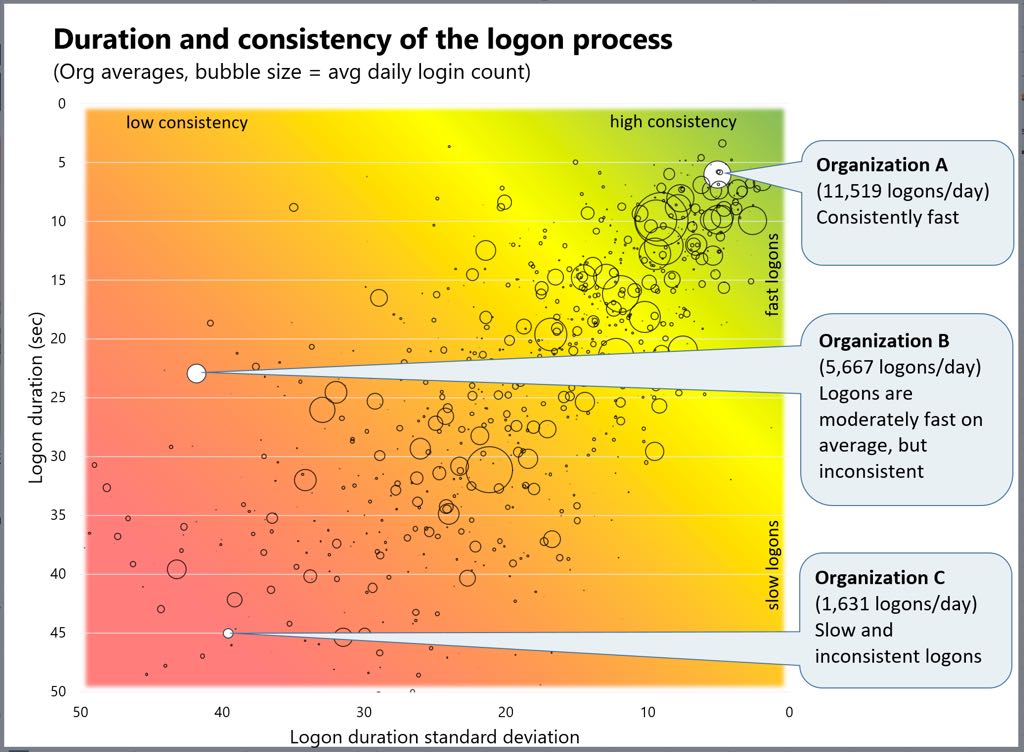
Lastly, in this paper we cover how to collect logon metrics, what the metrics mean, how they compare to other healthcare organizations, common causes of long logons, and we recommend four actionable steps to improve logon performance, should you need to. Investing in hardware or software for even a modest performance improvement can have a dramatic impact at the organization’s aggregate level.
You can download this research here.