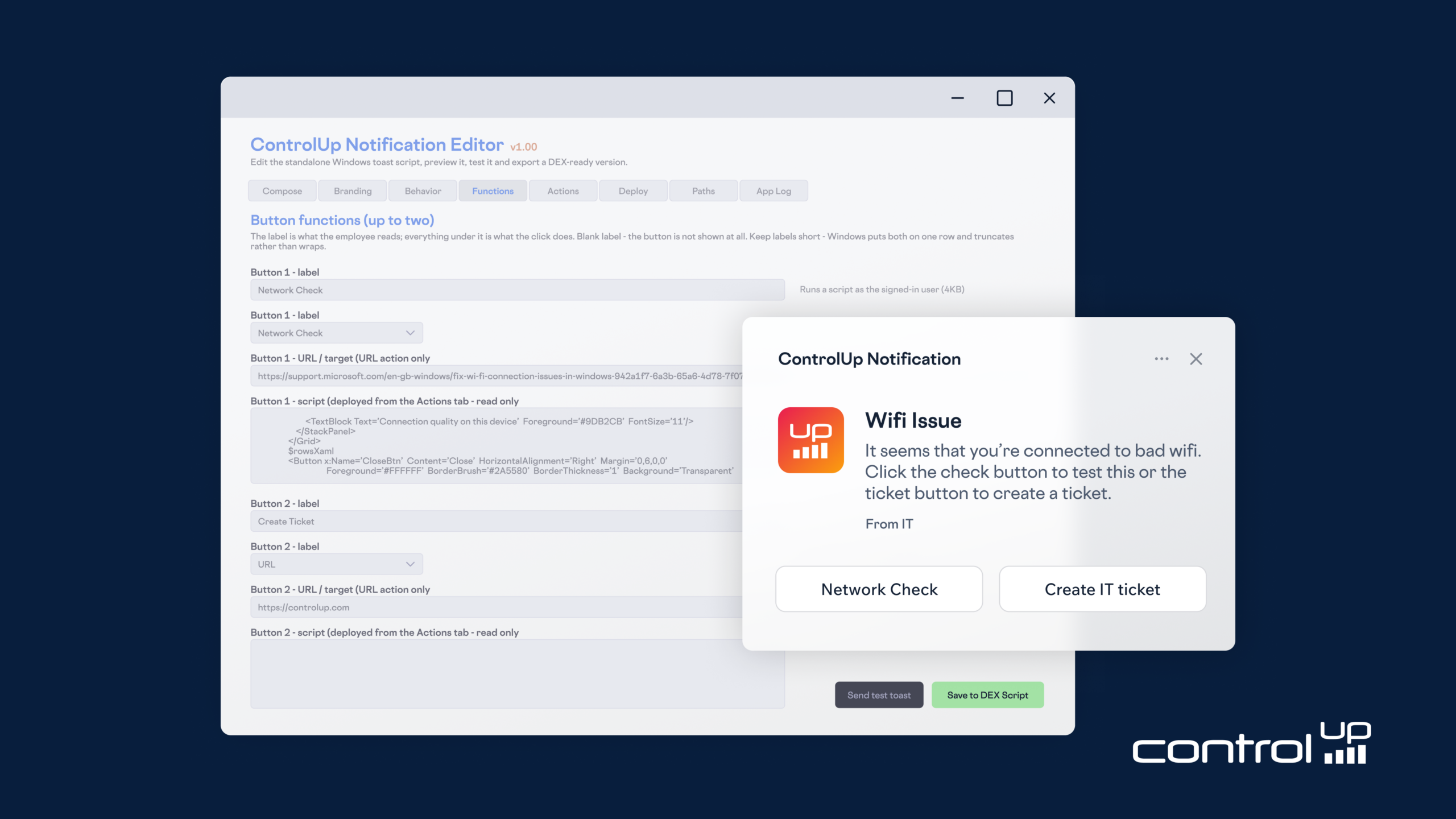
The ControlUp Notification Editor is a new tool enabling IT teams to create and deploy branded, actionable Windows notifications through ControlUp for Desktops, enhancing employee communication and self-service capabilities.
It provides a visual editor for designing custom notifications with company branding, diverse display options, and up to two clickable buttons.
Buttons can trigger PowerShell scripts for actions like guided troubleshooting, diagnostics, or restart choices, or simply link to resources.
The editor generates a deployable PowerShell script, supporting various delivery methods from user-level to SYSTEM-level, streamlining IT messages directly to endpoints.
The latest release from the Innovation Guild helps IT teams create branded Windows notifications that give employees a clear next step.
A restart reminder works better when employees can choose when to restart. A connection issue is easier to investigate when a diagnostic check is one click away. And a maintenance announcement is more useful when the details are right there.
That’s the idea behind the ControlUp Notification Editor, a new tool from the Innovation Guild for creating branded, actionable Windows notifications and deploying them through ControlUp for Desktops.
Build your message in a visual editor, add buttons that do useful work, and save it as a single PowerShell script ready to deploy. From everyday announcements to guided troubleshooting, it brings communication and action together on the employee’s desktop.
Your Message and Branding, with a Familiar Windows Experience
The Notification Editor lets you shape the experience around your organization. Add a title, message, attribution line, company logo, and optional banner image. The ControlUp Notification Editor comes with a live preview, so you can refine the wording and layout before sending it to your users.
You also control how the notification appears. Deliver a quiet update to the notification center, show a brief banner, or keep a message on screen until the employee responds. Choose sounds and notification priority to suit the situation.
For messages that need attention, the Stay on screen option uses Windows reminder behavior, allowing the notification to appear through Do Not Disturb.
Give Employees a Useful Next Step
Each notification supports up to two buttons. Use them to open a web page, dismiss the message, snooze it, or run a PowerShell action.
That creates practical ways to help employees:
- Make restarting more convenient. Offer options to restart now, choose a time today, or receive a reminder later.
- Put diagnostics within reach. Add a “Check my connection” button that tests connectivity to the default gateway and the internet, then displays the results.
- Offer a fix where it’s needed. Connect a button to your own PowerShell script for a known issue.
- Make announcements actionable. Link directly to maintenance details, guidance, or a support resource.
An optional auto-start action can also run as soon as the notification appears. For example, it can launch the included Reboot Assistant tray application so the experience continues after the notification closes.
Start with Ready-Made Actions, Then Make It Your Own
The included action library gives you a starting point with a Network Latency Check and Reboot Assistant actions, including reboot choices and a restart countdown that employees can accept or cancel.
Select an action, review its code, and insert it into a button or the auto-start slot. Each library action also runs independently, making it easier to test before adding it to a notification.
Need something specific to your environment? Add your own PowerShell. The generated script keeps action code readable, so your team can inspect what will run on an endpoint before deploying it.
Choose the Delivery Option that Fits The Job
A simple announcement and an action requiring administrator rights have different needs. The editor offers four delivery options to match:
- User (Inline): For messages, links, dismiss, and snooze, without script actions.
- User (Files): The standard choice for actions that run with the signed-in employee’s permissions.
- System (Files, Scheduled Task): For deployments launched as SYSTEM that deliver notifications into signed-in sessions while keeping actions under the employee’s permissions, without installing a service.
- System (Files, Service): For actions that need SYSTEM permissions, such as machine-level changes or service management. This option installs the notification service on its first run.
Both SYSTEM delivery options support multiple signed-in sessions, making them useful for session hosts as well as individual desktops.
From Editor to Endpoint in One Script
Once your notification is ready, use Send test toast to try it on your own machine. Then choose Save to DEX Script and add the generated PowerShell script to ControlUp for Desktops.
The notification, button actions, and embedded branding travel together in one file. Deploy it to the devices you choose, on demand or on a schedule.
The editor requires Windows PowerShell 5.1, and target endpoints need the ControlUp for Desktops agent. No API key or additional PowerShell module is required. If you choose the service delivery option, the script carries what it needs to build and install that service.
Bring Your Next IT Message to Life
Start with a familiar task: a restart reminder, a maintenance announcement, or a connection check. Add your branding, give employees a clear action, and test the experience before rolling it out.
With the ControlUp Notification Editor, your next message can help employees take the next step right from their desktop.
Please note: ControlUp Notification Editor v1.00 is an Innovation Guild script-based solution for use with ControlUp for Desktops. It is not a built-in product feature.