ControlUp bietet eine Vielzahl von Funktionen, um das digitale Erlebnis für Mitarbeiter zu verbessern, die jeden Desktop, jede Anwendung und jeden Ort nutzen.
Pulse AI analyzes real-time patterns across endpoints, apps, networks, and users. It suppresses expected activity to detect and alert only what matters.
Monitor, troubleshoot, and optimize every virtual desktop before slow sessions and app crashes interrupt your workforce.
ControlUp für DesktopsStay in control of every device. Prevent desktop issues before they disrupt employees or flood your IT queue.
ControlUp für ComplianceAutomate endpoint compliance across every device. Close security gaps and enforce policies without slowing IT down or getting in the way.
Pinpoint and fix SaaS and web app issues fast with real-time visibility across every device, browser, and network before employees feel the impact.
ControlUp Migrate für Windows 365Migrate faster with less risk. Automated workflows replace manual steps, so your move to Cloud PCs is done right.
ControlUp DaaS IQIntelligent autoscaling and cost control for Azure Virtual Desktop environments.
Smarter root cause analysis, automated remediation, and AI-powered diagnostics. Fix issues faster across every device and app.
Flickschusterei und Beseitigung von SchädenDeploy patches and remediate vulnerabilities across every endpoint, automatically and at scale. Stay secure without overwhelming IT.
Endpunktsicherheit und ComplianceSpot, prioritize, and remediate risks automatically. Keep endpoints secure and compliant without slowing desktop teams down.
Live-Remote-ManagementReal-time endpoint telemetry and silent remote remediation. See and fix issues the moment they happen, without disrupting the employee.
Proactively prevent issues and resolve tickets faster wherever hybrid workers are, whatever device they’re on.
Autonomer IT-BetriebShift IT from reactive to autonomous. Automatically detect, remediate, and prevent issues across your entire estate.
Steigern Sie die IT-EffizienzDo more with less. One platform to centralize visibility, streamline operations, and free IT to focus on what actually matters.
IT-KostenoptimierungRight-size VDI, reclaim unused licenses, and make smarter device refresh decisions backed by real usage data and performance metrics.
Entdecken Sie Inhalte, Tools und Erkenntnisse zur Vereinfachung der IT und zur Verbesserung der digitalen Mitarbeitererfahrung.
Eine globale Organisation von Technologieexperten, die den Markt für Desktop-Monitoring verändert.
ControlUp bietet eine Vielzahl von Funktionen, um das digitale Erlebnis für Mitarbeiter zu verbessern, die jeden Desktop, jede Anwendung und jeden Ort nutzen.
Pulse AI analyzes real-time patterns across endpoints, apps, networks, and users. It suppresses expected activity to detect and alert only what matters.
Monitor, troubleshoot, and optimize every virtual desktop before slow sessions and app crashes interrupt your workforce.
ControlUp für DesktopsStay in control of every device. Prevent desktop issues before they disrupt employees or flood your IT queue.
ControlUp für ComplianceAutomate endpoint compliance across every device. Close security gaps and enforce policies without slowing IT down or getting in the way.
Pinpoint and fix SaaS and web app issues fast with real-time visibility across every device, browser, and network before employees feel the impact.
ControlUp Migrate für Windows 365Migrate faster with less risk. Automated workflows replace manual steps, so your move to Cloud PCs is done right.
ControlUp DaaS IQIntelligent autoscaling and cost control for Azure Virtual Desktop environments.
Smarter root cause analysis, automated remediation, and AI-powered diagnostics. Fix issues faster across every device and app.
Flickschusterei und Beseitigung von SchädenDeploy patches and remediate vulnerabilities across every endpoint, automatically and at scale. Stay secure without overwhelming IT.
Endpunktsicherheit und ComplianceSpot, prioritize, and remediate risks automatically. Keep endpoints secure and compliant without slowing desktop teams down.
Live-Remote-ManagementReal-time endpoint telemetry and silent remote remediation. See and fix issues the moment they happen, without disrupting the employee.
Proactively prevent issues and resolve tickets faster wherever hybrid workers are, whatever device they’re on.
Autonomer IT-BetriebShift IT from reactive to autonomous. Automatically detect, remediate, and prevent issues across your entire estate.
Steigern Sie die IT-EffizienzDo more with less. One platform to centralize visibility, streamline operations, and free IT to focus on what actually matters.
IT-KostenoptimierungRight-size VDI, reclaim unused licenses, and make smarter device refresh decisions backed by real usage data and performance metrics.
Entdecken Sie Inhalte, Tools und Erkenntnisse zur Vereinfachung der IT und zur Verbesserung der digitalen Mitarbeitererfahrung.
Eine globale Organisation von Technologieexperten, die den Markt für Desktop-Monitoring verändert.
With the introduction of ControlUp’s Automation platform, a new world of possibilities has opened up for ControlUp users. From improving your user experience, to reducing troubleshooting time by gathering contextual information, to automating troubleshooting, the sky really is the limit with ControlUp automation.
In order to get the most out of your ControlUp automation platform, let’s discuss the best practices for naming your automation related incident triggers, so that you can quickly and easily distinguish them from non-automation related incident triggers.
The first best practice is to start the name for any automation-related incident trigger with “AA”. This immediately sets the trigger apart from any other trigger in your library and makes it easily accessible. When you start all your automation-related trigger names with “AA” they will all show up together so that you can easily sort and browse through the automation section of your triggers list.
The second best practice is to use the first letter of the object the trigger acts on (for example, C for Computers, S for Sessions, P for Processes and so on).
The third best practice is to use a descriptive name for the trigger, which would concisely and accurately describe what it does.
By combining all three practices you’ll get access to a few useful features:
Let’s go over some trigger naming ideas.
As mentioned, the third best practice would then be to input a short description of what the trigger actually does. Combining all three best practices would result in a name which would look like this: “AAS_Gather session info”. This three-part approach makes sense as it distinguishes your automation triggers and provides everyone within your organization a concise and accurate idea of the functionality they can expect from this trigger.
Here’s a few more examples:
When you look at the trigger setting screen and sort your view based on trigger name, you will be able to easily spot all your automation triggers, the objects that these triggers are invoked by and an informative description of the type of Script Action which is attached to this trigger.
Here is a quick example from our small demo lab:
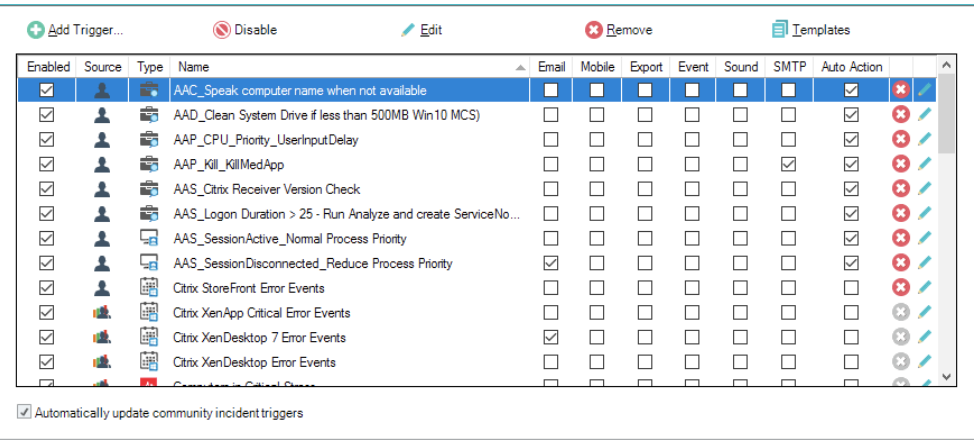
With structured, logically built naming conventions for your automated triggers you will be able to make the most of ControlUp’s automation platform and make your users’ life, as well as your own, much easier.
To try ControlUp and the Automation platform, download ControlUp from our website.
If you need any assistance or have any questions, drop us a line.