ControlUp offre un ensemble riche de capacités pour améliorer l'expérience numérique des employés qui utilisent n'importe quel bureau, n'importe quelle application, n'importe où.
Pulse AI analyzes real-time patterns across endpoints, apps, networks, and users. It suppresses expected activity to detect and alert only what matters.
Monitor, troubleshoot, and optimize every virtual desktop before slow sessions and app crashes interrupt your workforce.
ControlUp pour les ordinateurs de bureauStay in control of every device. Prevent desktop issues before they disrupt employees or flood your IT queue.
ControlUp pour la conformitéAutomate endpoint compliance across every device. Close security gaps and enforce policies without slowing IT down or getting in the way.
Pinpoint and fix SaaS and web app issues fast with real-time visibility across every device, browser, and network before employees feel the impact.
ControlUp Migrate pour Windows 365Migrate faster with less risk. Automated workflows replace manual steps, so your move to Cloud PCs is done right.
ControlUp DaaS IQIntelligent autoscaling and cost control for Azure Virtual Desktop environments.
Smarter root cause analysis, automated remediation, and AI-powered diagnostics. Fix issues faster across every device and app.
Rattrapage et remise en étatDeploy patches and remediate vulnerabilities across every endpoint, automatically and at scale. Stay secure without overwhelming IT.
Atténuation des risques liés aux points finauxSpot, prioritize, and remediate risks automatically. Keep endpoints secure and compliant without slowing desktop teams down.
Gestion à distance en directReal-time endpoint telemetry and silent remote remediation. See and fix issues the moment they happen, without disrupting the employee.
Proactively prevent issues and resolve tickets faster wherever hybrid workers are, whatever device they’re on.
Opérations informatiques autonomesShift IT from reactive to autonomous. Automatically detect, remediate, and prevent issues across your entire estate.
Augmenter l'efficacité des technologies de l'informationDo more with less. One platform to centralize visibility, streamline operations, and free IT to focus on what actually matters.
Optimisation des coûts informatiquesRight-size VDI, reclaim unused licenses, and make smarter device refresh decisions backed by real usage data and performance metrics.
Découvrez du contenu, des outils et des idées pour simplifier l'informatique et améliorer l'expérience numérique des employés.
Une organisation mondiale de professionnels de la technologie qui transforme le marché de la surveillance des postes de travail.
ControlUp offre un ensemble riche de capacités pour améliorer l'expérience numérique des employés qui utilisent n'importe quel bureau, n'importe quelle application, n'importe où.
Pulse AI analyzes real-time patterns across endpoints, apps, networks, and users. It suppresses expected activity to detect and alert only what matters.
Monitor, troubleshoot, and optimize every virtual desktop before slow sessions and app crashes interrupt your workforce.
ControlUp pour les ordinateurs de bureauStay in control of every device. Prevent desktop issues before they disrupt employees or flood your IT queue.
ControlUp pour la conformitéAutomate endpoint compliance across every device. Close security gaps and enforce policies without slowing IT down or getting in the way.
Pinpoint and fix SaaS and web app issues fast with real-time visibility across every device, browser, and network before employees feel the impact.
ControlUp Migrate pour Windows 365Migrate faster with less risk. Automated workflows replace manual steps, so your move to Cloud PCs is done right.
ControlUp DaaS IQIntelligent autoscaling and cost control for Azure Virtual Desktop environments.
Smarter root cause analysis, automated remediation, and AI-powered diagnostics. Fix issues faster across every device and app.
Rattrapage et remise en étatDeploy patches and remediate vulnerabilities across every endpoint, automatically and at scale. Stay secure without overwhelming IT.
Atténuation des risques liés aux points finauxSpot, prioritize, and remediate risks automatically. Keep endpoints secure and compliant without slowing desktop teams down.
Gestion à distance en directReal-time endpoint telemetry and silent remote remediation. See and fix issues the moment they happen, without disrupting the employee.
Proactively prevent issues and resolve tickets faster wherever hybrid workers are, whatever device they’re on.
Opérations informatiques autonomesShift IT from reactive to autonomous. Automatically detect, remediate, and prevent issues across your entire estate.
Augmenter l'efficacité des technologies de l'informationDo more with less. One platform to centralize visibility, streamline operations, and free IT to focus on what actually matters.
Optimisation des coûts informatiquesRight-size VDI, reclaim unused licenses, and make smarter device refresh decisions backed by real usage data and performance metrics.
Découvrez du contenu, des outils et des idées pour simplifier l'informatique et améliorer l'expérience numérique des employés.
Une organisation mondiale de professionnels de la technologie qui transforme le marché de la surveillance des postes de travail.
Slow logons are a bane to EUC users. It’s one of those metrics where you can count the instances, measure how long they took, multiply it by your employee’s hourly rate and come up with the cost in lost end-user time. Speeding up logons or getting people to be productive as fast as possible is one of the promises of FSLogix.
For the most part, FSLogix works. The FSLogix profile container CAN improve logon times! The primary wins in reducing logon times that I’ve seen using FSLogix are removing the AppX Package Load Time that occurs on VDI machines (e.g. Microsoft “Preparing Windows” or “This won’t take long”)…

…and reducing the amount of time Outlook takes to load and have its search function fully operational.
Profile container technology such as FSLogix has dependencies that can cause performance problems. These dependencies can be network, storage, compute performance on the VM, etc. There has been some fabulous research on scalability of FSLogix by the Go-EUC guys here.
However, if you have FSLogix, and you encounter slower logons, the main method of troubleshooting is to use the FSLogix Profile Status tool, or just edit the log file directly. The FSLogix Profile Status tool nicely breaks out the sections of the feature, but the negative is that is all the filtering it does. It doesn’t filter temporally or by the user who is having the problem so it is still difficult to troubleshoot as you still need to find when the slowness occurred and for whom.
Les ControlUp FSLogix Log Parser will read the FSLogix log file, and, by passing in the parameters for the user, session, and logon time this script can identify and display only the events from that time period for that user. I believe this will reduce your dépannage time by showing only the events when the slowness occurred. Not only does this reduce the amount of logging information you need to go through but the information is now specific to that slow logon event.
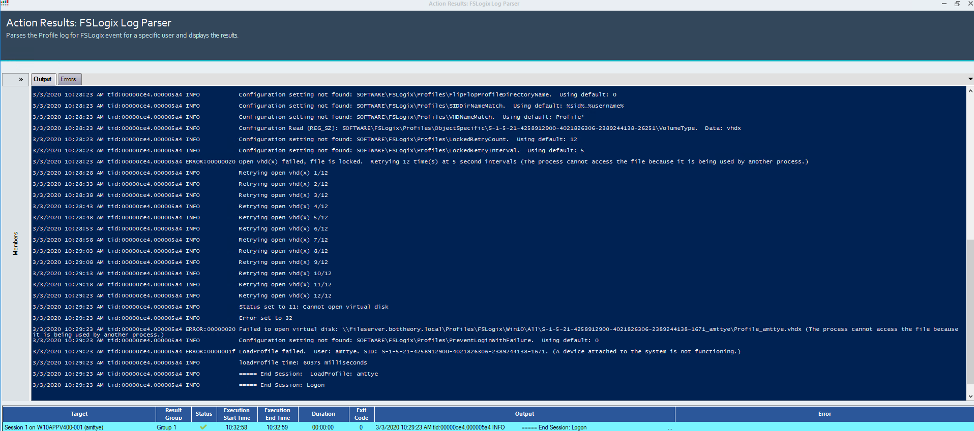
In this example, I encountered a slow logon. I was able to use the new Script Action to VERY quickly identify that the file was locked, which delayed my logon for 60 seconds. The delay is due to the LockedRetryCount reattempting 12 times, with a delay of 5 seconds per attempt. In reality, the delay was due to me logging into two different VDI machines where I have FSLogix configured for single user only — the first logon succeeding, the second attempting to access a file already in use and delaying out.
But using the FSLogix Log Parser I was able to quickly identify what happened, why, and I have some options for reducing my logon times by modifying these values or changing how I load profiles.