The platform driving autonomous IT operations and better digital employee experiences across every desktop, application, and location.
Monitor, troubleshoot, and optimize every virtual desktop before slow sessions and app crashes interrupt your workforce.
ControlUp for DesktopsStay in control of every device. Prevent desktop issues before they disrupt employees or flood your IT queue.
ControlUp for ComplianceAutomate endpoint compliance across every device. Close security gaps and enforce policies without slowing IT down or getting in the way.
Pinpoint and fix SaaS and web app issues fast with real-time visibility across every device, browser, and network before employees feel the impact.
ControlUp Migrate for Windows 365Migrate faster with less risk. Automated workflows replace manual steps, so your move to Cloud PCs is done right.
ControlUp DaaS IQIntelligent autoscaling and cost control for Azure Virtual Desktop environments.
Smarter root cause analysis, automated remediation, and AI-powered diagnostics. Fix issues faster across every device and app.
Patching & RemediationDeploy patches and remediate vulnerabilities across every endpoint, automatically and at scale. Stay secure without overwhelming IT.
Endpoint Risk MitigationSpot, prioritize, and remediate risks automatically. Keep endpoints secure and compliant without slowing desktop teams down.
Live Remote ManagementReal-time endpoint telemetry and silent remote remediation. See and fix issues the moment they happen, without disrupting the employee.
Proactively prevent issues and resolve tickets faster wherever hybrid workers are, whatever device they’re on.
Autonomous IT OperationsShift IT from reactive to autonomous. Automatically detect, remediate, and prevent issues across your entire estate.
Increase IT EfficiencyDo more with less. One platform to centralize visibility, streamline operations, and free IT to focus on what actually matters.
IT Cost OptimizationRight-size VDI, reclaim unused licenses, and make smarter device refresh decisions backed by real usage data and performance metrics.
Explore content, tools, and insights to simplify IT and improve the digital employee experience.
A global organization of technology professionals transforming the desktop monitoring marketplace.
The platform driving autonomous IT operations and better digital employee experiences across every desktop, application, and location.
Monitor, troubleshoot, and optimize every virtual desktop before slow sessions and app crashes interrupt your workforce.
ControlUp for DesktopsStay in control of every device. Prevent desktop issues before they disrupt employees or flood your IT queue.
ControlUp for ComplianceAutomate endpoint compliance across every device. Close security gaps and enforce policies without slowing IT down or getting in the way.
Pinpoint and fix SaaS and web app issues fast with real-time visibility across every device, browser, and network before employees feel the impact.
ControlUp Migrate for Windows 365Migrate faster with less risk. Automated workflows replace manual steps, so your move to Cloud PCs is done right.
ControlUp DaaS IQIntelligent autoscaling and cost control for Azure Virtual Desktop environments.
Smarter root cause analysis, automated remediation, and AI-powered diagnostics. Fix issues faster across every device and app.
Patching & RemediationDeploy patches and remediate vulnerabilities across every endpoint, automatically and at scale. Stay secure without overwhelming IT.
Endpoint Risk MitigationSpot, prioritize, and remediate risks automatically. Keep endpoints secure and compliant without slowing desktop teams down.
Live Remote ManagementReal-time endpoint telemetry and silent remote remediation. See and fix issues the moment they happen, without disrupting the employee.
Proactively prevent issues and resolve tickets faster wherever hybrid workers are, whatever device they’re on.
Autonomous IT OperationsShift IT from reactive to autonomous. Automatically detect, remediate, and prevent issues across your entire estate.
Increase IT EfficiencyDo more with less. One platform to centralize visibility, streamline operations, and free IT to focus on what actually matters.
IT Cost OptimizationRight-size VDI, reclaim unused licenses, and make smarter device refresh decisions backed by real usage data and performance metrics.
Explore content, tools, and insights to simplify IT and improve the digital employee experience.
A global organization of technology professionals transforming the desktop monitoring marketplace.

 Yoni Avital
 If your environment contains a Provisioning Services Server, then you won’t want to miss this Script Based Action (SBA). With ControlUp and this SBA you will know if there is a high amount of Target Device retries.
When working with PVS, I/O transactions happen between the local driver on a target device machine, the network and the PVS server itself. In the case when a client fails to get a response to an I/O request, it may try to send a request again, a retry. Instead of checking the Target Device tray on the PVS server manually, this SBA gives you a quick overview of the number of retries the Target Device makes. When running the SBA, it will prompt you to choose the PVS server and will ask for credentials.

And if you want to check your load index, download this SBA…
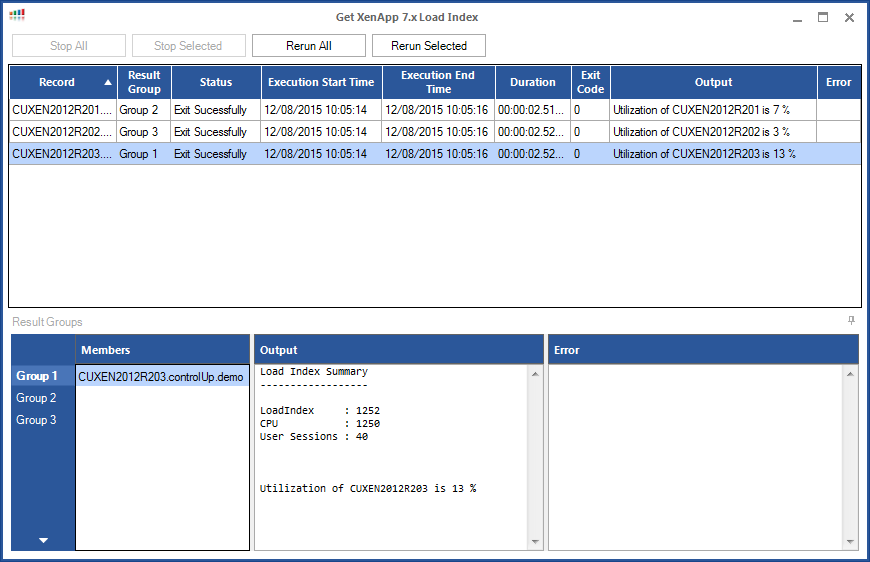
Get XenApp 7.x Load Index
An important metric of a XenApp Server OS machine is the Load Index. In case the server is configured to act as a Multi-Session, each user connected to the server will contribute to the overall load of the server. Other possible contributors can be Memory, CPU and Disk, depending on the configured policy applied to the server. This Script Based Action (SBA) will show the Load Index attribute of the server and the contribution of each resource to the Load. The SBA can run against multiple servers of a particular site. The following parameters are required:
- Specify one of the site Delivery Controllers
- Provide sufficient user permissions to the site
Manage and monitor your VDI environment from one single dashboard. Read more here.