Shadow AI, the unauthorized use of artificial intelligence tools by employees, introduces significant data leakage, compliance, and security risks that organizations must address through strategic management, not outright bans.
- Shadow AI spreads quickly because employees seek productivity gains and tools are easily accessible, creating vulnerabilities such as sensitive data exposure and potential violations of compliance standards like HIPAA or GDPR.
- Instead of banning AI, which only drives usage underground, organizations should prioritize gaining visibility into which AI tools employees are using and how they are being leveraged.
- Leveraging AI usage monitoring dashboards, such as ControlUp’s AI Report Dashboard, allows IT to track AI tool adoption, identify usage patterns, mitigate risks, and transition to a controlled "Managed AI" environment.
An employee throws some sales call notes into a chatbot and asks it to write a follow-up email. Someone else uses a free AI tool to summarize a customer contract. Yet another team member feeds private code into a coding assistant, one that security doesn’t even know about.
By the time IT finds out, it’s too late. Your organization’s proprietary or private data is already out in the wild.
Shadow AI refers to employees using AI tools on their own, without getting prior approval and often without informing IT.
No one is still asking whether or not employees should use AI. That ship has sailed. The question now is if IT can actually see which kinds of AI employees are using, without awkwardly leering over anyone’s shoulders.
Why Shadow AI Spreads Faster Than Shadow IT Ever Did
Shadow IT, such as the use of unapproved cloud storage and messaging apps, was an elusive beast for a very long time. It took many organizations more than a decade to bring it under control. Shadow AI is moving faster because there aren’t any significant barriers to entry. You just hop on a website and team up with an AI. With shadow IT, employees often had to download an app and obtain approval before installing it. This isn’t the case with shadow AI, which is largely plug-and-play.
Additionally, even the most rampant AI tool sprawl doesn’t stem from malicious intent. Employees are just trying to get their work done faster because we’re collectively being asked to do more than ever. And there’s no arguing that AI can make this easier.
The problem is the AI compliance risks that come with unmonitored use. Unauthorized AI use exposes data and systems to a range of uncomfortable risks, raising the question: “You approved the laptop, but what about the AI tools running on it?”
What Unmanaged AI Usage Actually Exposes You To
Many AI risks fly under the radar because the tech is so new. Here are the kinds of shadow AI risks you should keep top of mind.
Data Leakage
Employees can easily input customer info, financials, source code, unreleased product details, and far more into an AI tool. And IT has no visibility into:
- How the data gets retained by the AI tool
- How the tool uses it for training systems
- Whether downstream users can gain access to it
The shadow IT vs shadow AI discussion often overlooks the above dangers. An AI governance, risk, and compliance (GRC) system needs to address issues that, in many ways, pose even greater danger than those associated with shadow IT.
For example, suppose someone in accounting asks Claude to help build a cash flow spreadsheet. They feed Claude a ton of revenue and expense data. Without knowing how Claude uses this data, there’s no way to be 100% sure the AI won’t reveal it to another user, especially if they enter just the right query. A breach could put everything from the organization’s credit rating to its valuation at risk.
Just look at the recent onslaught of Reddit users who reported finding Claude conversations in search results. In July, hundreds of user conversations with Anthropic’s Claude AI chatbot were discovered to have been indexed and publicly accessible on search engines like Google and Bing. The links generated via Claude’s “Share” feature—which were intended for individual sharing—lacked proper search blocking, making user-shared chat logs and artifacts searchable web content. Anthropic is issuing statements to address these kinds of cybersecurity incidents just a year after OpenAI experienced a nearly identical issue, with ChatGPT chat logs made publicly accessible. Yikes.
Compliance Gaps
Compliance standards, like HIPAA and GDPR, don’t have “AI exceptions,” which makes it easy for an employee to slip up. Consider this example…
HIPAA requires organizations to control how they disclose protected health information (PHI) to third parties. Typically, they need to establish a Business Associate Agreement (BAA) with any vendor to whom they give access to PHI.
Now, suppose a customer support representative at a healthcare company gets tired of manually summarizing notes from patient calls. So she tosses a bunch of them into ChatGPT and asks for a summary.
Like many companies, her employer doesn’t have a BAA with OpenAI. So when she submits her request, which includes the PHI she has pasted in, she has violated HIPAA standards, particularly if she doesn’t disclose the activity.
Inconsistent Security Posture
When a human working closely with the IT team writes code, the software they build typically undergoes a security review process. This is not the case when someone’s “vibe coding” with AI.
To get an MVP up and running, a programmer may use lax security settings in an app they build. For instance, the rights to perform CRUD actions in the database may be open to “anyone.” This makes it easier for random, fake test users to post data to the database, but the AI isn’t going to force the programmer to tighten security before it continues writing code. Then, when the app goes live, its permissions invite a range of database attacks.
No Incident Response Path
Shadow AI can make it nearly impossible to build an incident response path. Let’s say a marketing analyst in your organization finds an AI tool that automatically generates summaries of the competition’s websites, as well as internal campaign performance decks. He came across it in a LinkedIn post and installed it himself. He didn’t run it by IT, so they have zero awareness or visibility.
A few months go by without incident. But suddenly, a competitor launches a marketing campaign that’s eerily similar to one your company has planned for an unreleased product. The phrasing is nearly identical to that used in one of your marketing analyst’s decks. The legal department asks IT to investigate.
But IT doesn’t even have a starting point. The AI tool isn’t on the asset inventory list, and there’s no log of the data it used to train the model.
Why Banning AI Outright Backfires
An employee who has fallen in love with an AI tool isn’t going to stop using it just because IT says not to. For many well-meaning employees, AI takes their productivity to the next level. They can finally do more in less time and make fewer mistakes along the way. So an employee who has fallen in love with an AI tool isn’t going to stop using it just because IT says not to. Instead, they just conveniently won’t tell IT. And this can hurt the digital employee experience (DEX).
So instead of solving the problem, an AI ban creates a new one. It turns well-meaning employees into subversive individuals who must skulk around while they violate “company culture.”
Banning AI tools can also feel like a double standard. On the one hand, your organization encourages high-quality work. On the other hand, a ban blocks team members from the tools that help them deliver exactly the kind of output you’re looking for. There must be engagement from both sides on compliance for the sake of security, while allowing employees to use the tools that enable them to do their best work. There are many potential paths to success, and no one will work for every company.
Throwing policies at employees won’t work; they’re going to use AI anyway. But what can you do to monitor their AI usage and ensure guardrails are in place to maintain proper system compliance?
Think Visibility First, Policy Second
Governance is step two. Visibility is step one. You have to know which AI tools people use, how many use each tool, and how much time they spend on it.
Here’s a checklist of questions you can use to evaluate your AI visibility posture:
- Which AI apps and websites are employees actually using across our organization?
- When are they using them? Are they accessing them right now?
- Which tools seem to be gaining popularity among our workforce, and does this indicate a productivity need that IT and management should address?
- Which usage patterns may pose data risks?
Leverage an AI Visibility Report
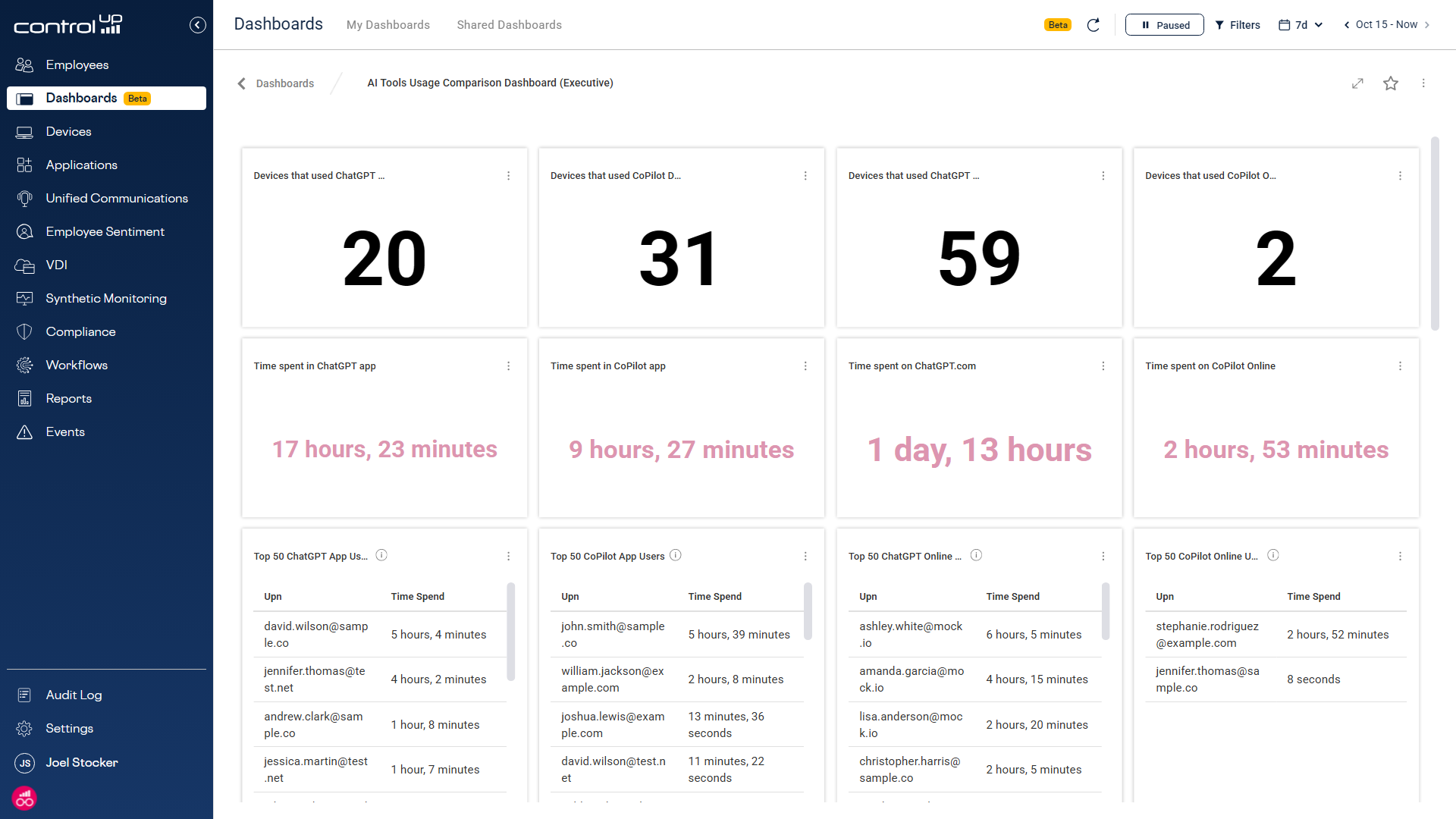
Last year, the ControlUp Innovation Guild released an AI Report Dashboard to help answer these questions. It includes two built-in views to give you various levels of detail. The AI Apps and Sites Usage Dashboard shows the big picture: total users, percentage of time spent, and adoption trends across all AI activity. The AI Tools Usage Comparison Dashboard breaks that down further, tool by tool, so you can see:
- Which managed and unmanaged AI tools employees use, from ChatGPT to Copilot to Claude
- The amount of time team members spend on each specific tool
- Adoption trends that may indicate efficiency gaps in employee workflows
- The top 50 AI users across your organization, by tool
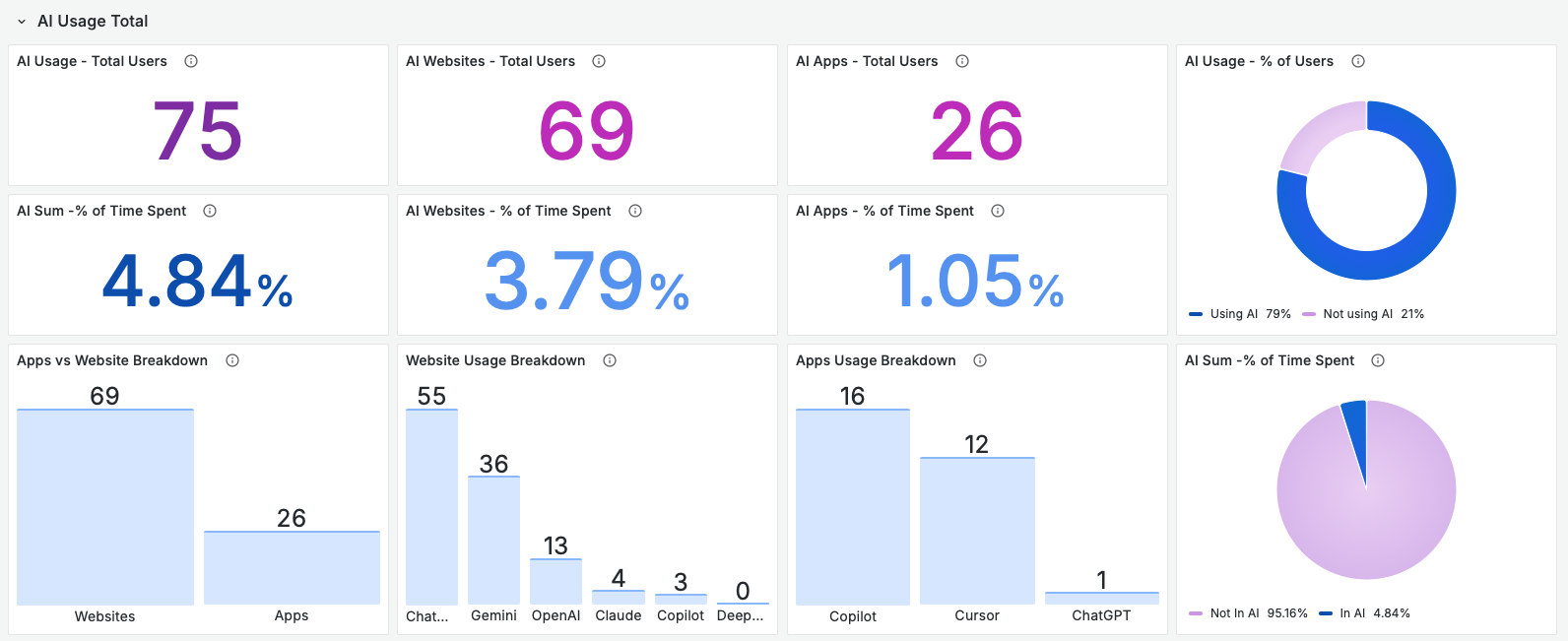
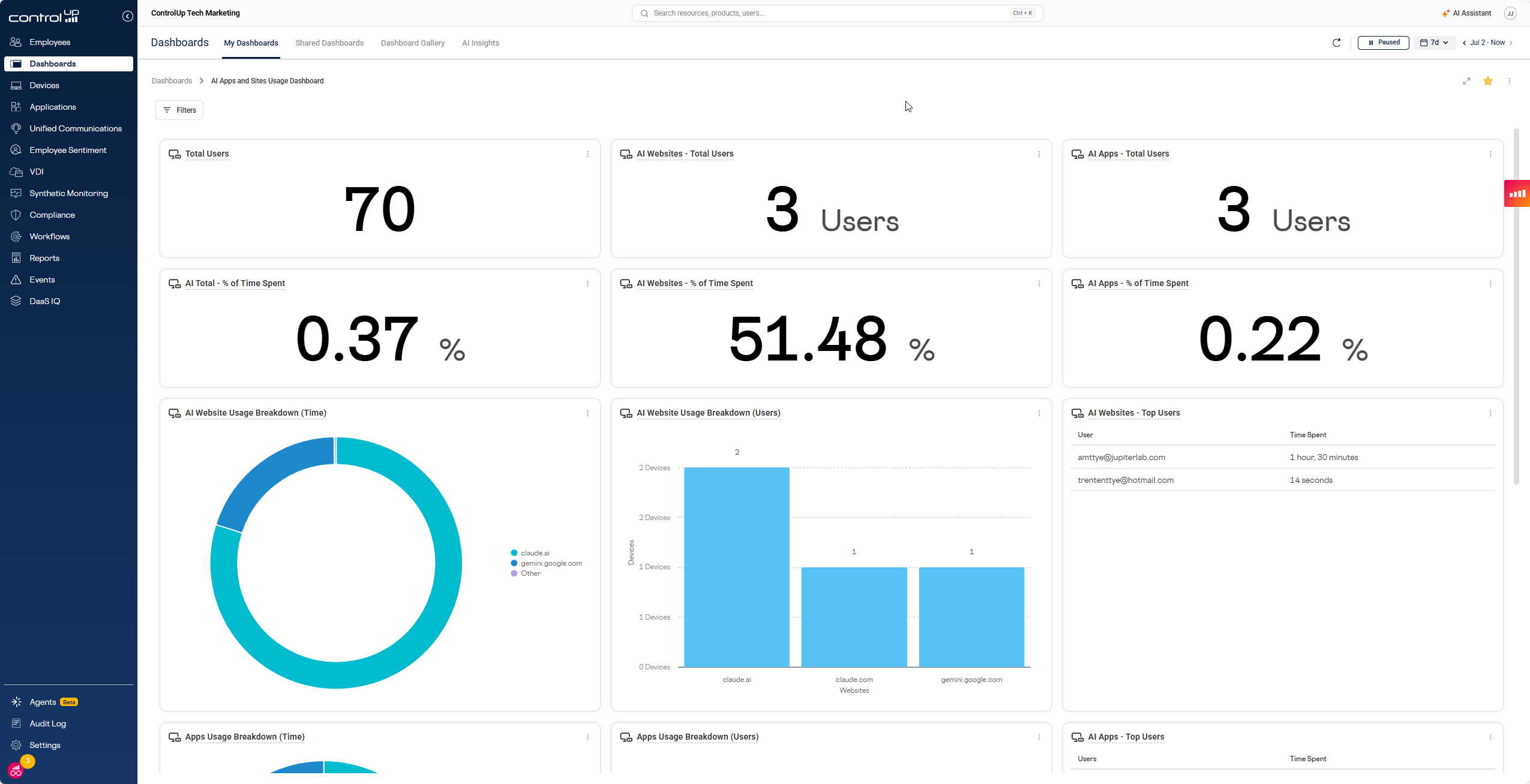
Figure 2 – AI Apps and Sites Usage Dashboard
This visibility can extend way beyond usage into savings, too. ControlUp for Apps also tracks SaaS and web app licenses, so you can reclaim unused ones that nobody’s touching, including AI tools. If your organization is paying for seats on an AI tool that half your team never opens, that’s the same budget leakage as an unused Slack or Miro license. You can see it, and you can act on it.
With AI-powered employee monitoring, you can clearly see how your teams are using these tools. You can then use that knowledge to better meet their needs while limiting your organization’s risk, and cut the AI licenses nobody’s using while you’re at it.
Move From Shadow AI to Managed AI
The AI digital workplace is here to stay, and that’s good news. Employee AI usage trends shine a light on needs that IT hasn’t yet met. Once you know what employees are using, you can identify an approved, secure, properly licensed alternative.
Download ControlUp’s AI Report dashboard or book a demo with us to learn more.
