
The platform driving autonomous IT operations and better digital employee experiences across every desktop, application, and location.
Monitor, troubleshoot, and optimize every virtual desktop before slow sessions and app crashes interrupt your workforce.
ControlUp for DesktopsStay in control of every device. Prevent desktop issues before they disrupt employees or flood your IT queue.
ControlUp for ComplianceAutomate endpoint compliance across every device. Close security gaps and enforce policies without slowing IT down or getting in the way.
Pinpoint and fix SaaS and web app issues fast with real-time visibility across every device, browser, and network before employees feel the impact.
ControlUp Migrate for Windows 365Migrate faster with less risk. Automated workflows replace manual steps, so your move to Cloud PCs is done right.
ControlUp DaaS IQIntelligent autoscaling and cost control for Azure Virtual Desktop environments.
Unified real-time monitoring, alerting, and remote control of every managed device from one console.
VDI & DaaSPerformance monitoring, cost optimization, and orchestration across Citrix, AVD, Windows 365, Horizon and more.
Autonomous Endpoint ManagementRoot-cause detection and self-healing remediation that resolves common issues without a human touching a ticket.
Continuous compliance and security-posture monitoring with automated enforcement across the whole estate.
Digital Employee ExperienceReal-time sentiment and visibility into how every device, app, and network actually feels to the person using it.
Explore All SolutionsExplore content, tools, and insights to simplify IT and improve the digital employee experience.
A global organization of technology professionals transforming the desktop monitoring marketplace.
The platform driving autonomous IT operations and better digital employee experiences across every desktop, application, and location.
Monitor, troubleshoot, and optimize every virtual desktop before slow sessions and app crashes interrupt your workforce.
ControlUp for DesktopsStay in control of every device. Prevent desktop issues before they disrupt employees or flood your IT queue.
ControlUp for ComplianceAutomate endpoint compliance across every device. Close security gaps and enforce policies without slowing IT down or getting in the way.
Pinpoint and fix SaaS and web app issues fast with real-time visibility across every device, browser, and network before employees feel the impact.
ControlUp Migrate for Windows 365Migrate faster with less risk. Automated workflows replace manual steps, so your move to Cloud PCs is done right.
ControlUp DaaS IQIntelligent autoscaling and cost control for Azure Virtual Desktop environments.
Unified real-time monitoring, alerting, and remote control of every managed device from one console.
VDI & DaaSPerformance monitoring, cost optimization, and orchestration across Citrix, AVD, Windows 365, Horizon and more.
Autonomous Endpoint ManagementRoot-cause detection and self-healing remediation that resolves common issues without a human touching a ticket.
Continuous compliance and security-posture monitoring with automated enforcement across the whole estate.
Digital Employee ExperienceReal-time sentiment and visibility into how every device, app, and network actually feels to the person using it.
Explore All SolutionsExplore content, tools, and insights to simplify IT and improve the digital employee experience.
A global organization of technology professionals transforming the desktop monitoring marketplace.
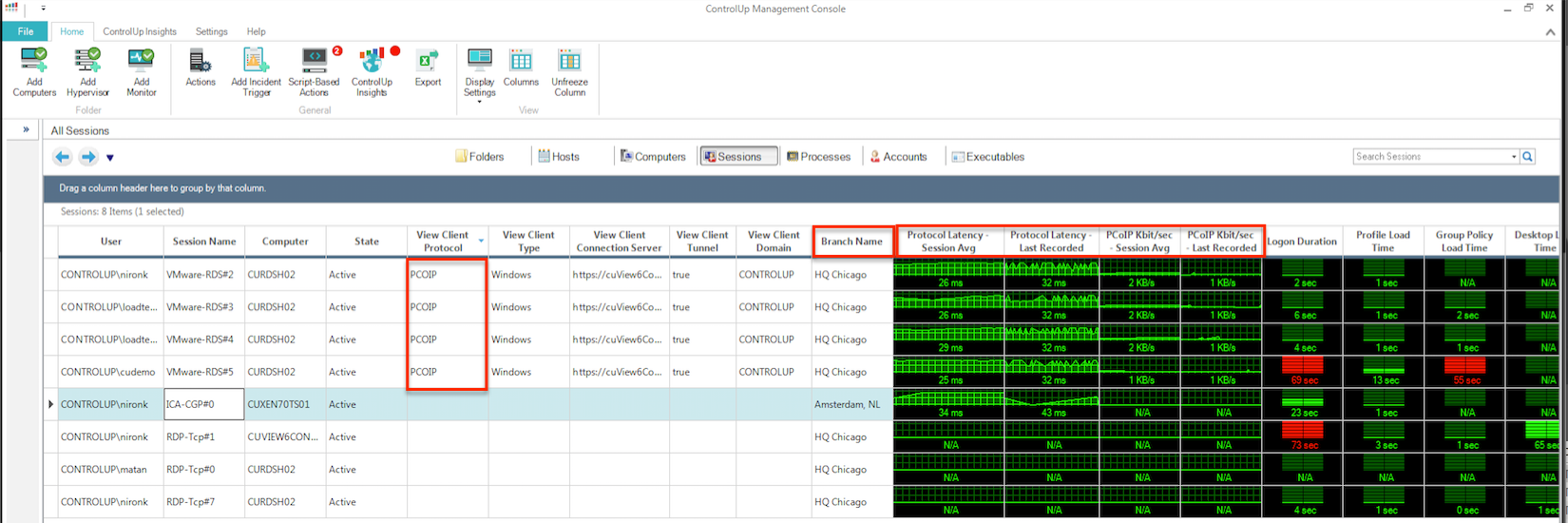
ControlUp now exposes PCoIP information for our growing Horizon View customer base. These new metrics are part of ControlUp’s session grid.
Admins who monitor multiple flavors of VDI sessions such as Citrix, VMware and RDS, can now see them all in one grid.
ControlUp collects and presents latency and bandwidth metrics for PcoIP sessions:
We added another interesting column in ControlUp 5.0 called Branch Name. This enables you to quickly find if session latency and/or bandwidth issues are related to a specific location, or company branch.
When a deeper level of information and analysis is required, use a great Script-Based Action (SBA) .
This PowerShell script uses WMI to get bandwidth usage statistics on Horizon View PCoIP sessions. It retrieves current information from WMI about overall network usage and packet loss, as well as latency with a breakdown into imaging, audio and USB-based traffic types, in order to provide more insight into the causes of high network usage in those sessions.
Here’s what this SBA’s output looks like:
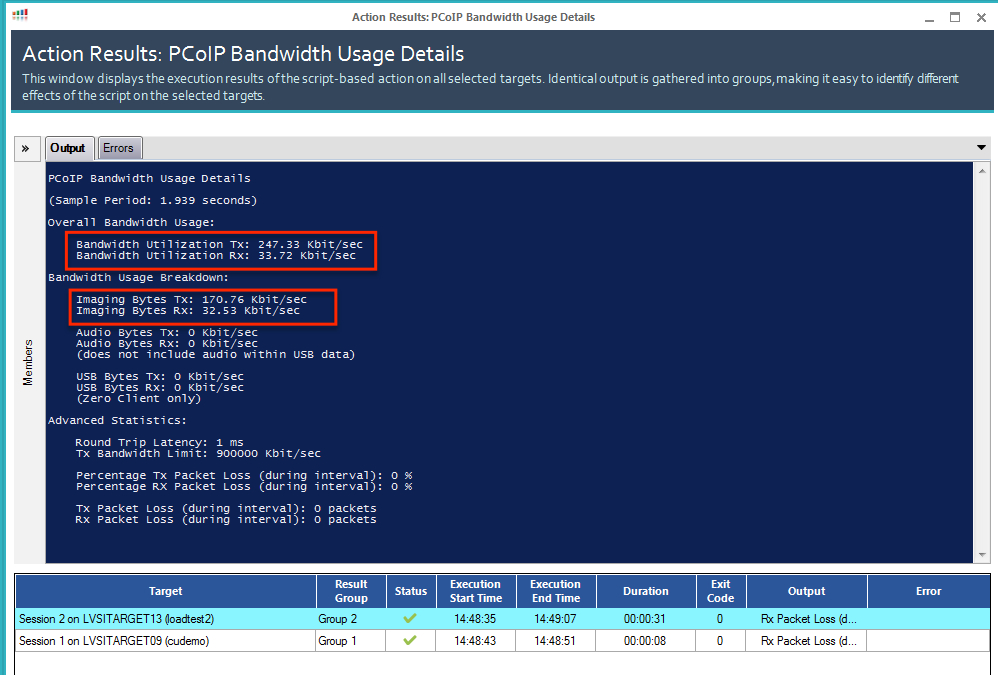
In this example, the session’s bandwidth usage is mostly for imaging. This indicates that someone is probably streaming some type media. It’s good to see those insights coming to you, isn’t it?
For more information about ControlUp’s solution for VMware Horizon.