The platform driving autonomous IT operations and better digital employee experiences across every desktop, application, and location.
Monitor, troubleshoot, and optimize every virtual desktop before slow sessions and app crashes interrupt your workforce.
ControlUp for DesktopsStay in control of every device. Prevent desktop issues before they disrupt employees or flood your IT queue.
ControlUp for ComplianceAutomate endpoint compliance across every device. Close security gaps and enforce policies without slowing IT down or getting in the way.
Pinpoint and fix SaaS and web app issues fast with real-time visibility across every device, browser, and network before employees feel the impact.
ControlUp Migrate for Windows 365Migrate faster with less risk. Automated workflows replace manual steps, so your move to Cloud PCs is done right.
ControlUp DaaS IQIntelligent autoscaling and cost control for Azure Virtual Desktop environments.
Unified real-time monitoring, alerting, and remote control of every managed device from one console.
VDI & DaaSPerformance monitoring, cost optimization, and orchestration across Citrix, AVD, Windows 365, Horizon and more.
Autonomous Endpoint ManagementRoot-cause detection and self-healing remediation that resolves common issues without a human touching a ticket.
Continuous compliance and security-posture monitoring with automated enforcement across the whole estate.
Digital Employee ExperienceReal-time sentiment and visibility into how every device, app, and network actually feels to the person using it.
Explore All SolutionsExplore content, tools, and insights to simplify IT and improve the digital employee experience.
A global organization of technology professionals transforming the desktop monitoring marketplace.
The platform driving autonomous IT operations and better digital employee experiences across every desktop, application, and location.
Monitor, troubleshoot, and optimize every virtual desktop before slow sessions and app crashes interrupt your workforce.
ControlUp for DesktopsStay in control of every device. Prevent desktop issues before they disrupt employees or flood your IT queue.
ControlUp for ComplianceAutomate endpoint compliance across every device. Close security gaps and enforce policies without slowing IT down or getting in the way.
Pinpoint and fix SaaS and web app issues fast with real-time visibility across every device, browser, and network before employees feel the impact.
ControlUp Migrate for Windows 365Migrate faster with less risk. Automated workflows replace manual steps, so your move to Cloud PCs is done right.
ControlUp DaaS IQIntelligent autoscaling and cost control for Azure Virtual Desktop environments.
Unified real-time monitoring, alerting, and remote control of every managed device from one console.
VDI & DaaSPerformance monitoring, cost optimization, and orchestration across Citrix, AVD, Windows 365, Horizon and more.
Autonomous Endpoint ManagementRoot-cause detection and self-healing remediation that resolves common issues without a human touching a ticket.
Continuous compliance and security-posture monitoring with automated enforcement across the whole estate.
Digital Employee ExperienceReal-time sentiment and visibility into how every device, app, and network actually feels to the person using it.
Explore All SolutionsExplore content, tools, and insights to simplify IT and improve the digital employee experience.
A global organization of technology professionals transforming the desktop monitoring marketplace.
Profile management is an important aspect of every Application or Desktop virtualization implementation. Regardless if you have a user profile management solution or if you manage your users’ profile locally, it is important to monitor and moderate the profile size and composition (total amount of files).
Monitoring the user profile size and its storage capacity utilization is important for obvious reasons. However the profile composition (i.e. the total amount of files that make up the user profile) is another important aspect that needs to be monitored since in many cases if a profile has an exaggerated amount of files it may affect logon times, primarily because it will take a long time to enumerate them all. This is especially if you have a third party user profile management solution like Citrix User Profile Manager.
Let’s take a look at a synthetic scenario where we are using Citrix User Profile Management and the user profile contains a lot of files.
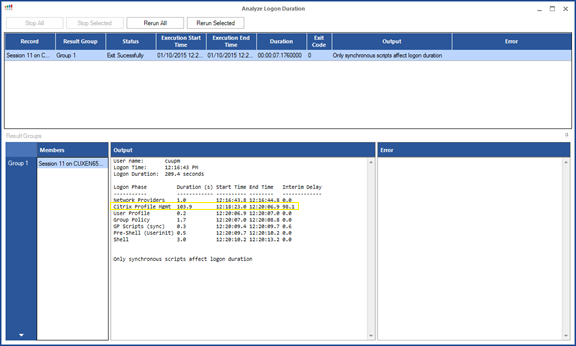
By running the Analyze Logon Duration script we can see that the logon duration for that session was slow, and that the main contributor to the delay is the Citrix User Profile Management component.
Now we’ll look at the profile factors using the new “Calculate User Profile Size” ControlUp SBA (Script Based Action).
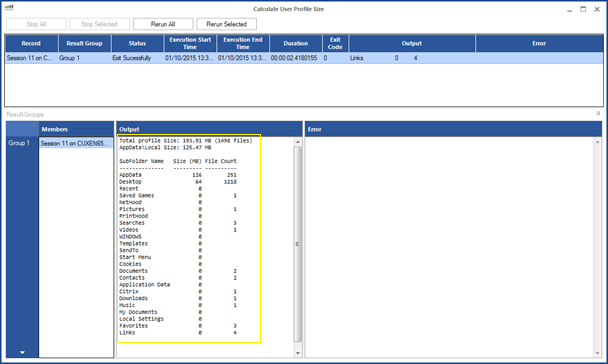
Our Profile has 1,500 files overall. Most of them are just script generated txt files inside “New Folder”.
We know that Citrix User Profile Management will impact the Logon Duration for a Profile that has a large amount of files.

Let’s replace the 1,215 files which weigh less than 5MB with a single 5MB file, that way we can make sure that the problem really lies within the numbers.
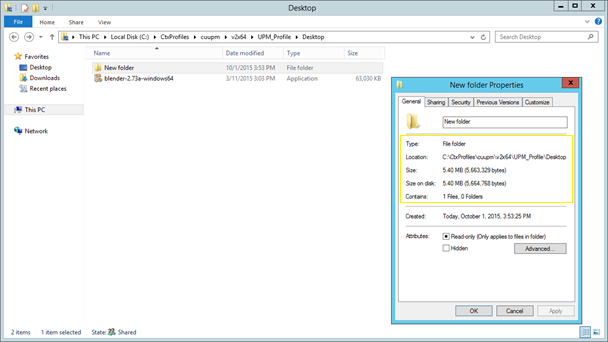
And now let’s run the Analyze Logon Duration SBA again.
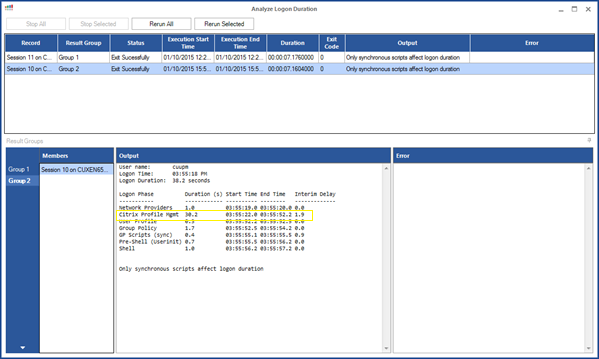
Quite an improvement in logon times!
To summarize, the Calculate User Profile Size script can be a useful tool in the administrator’s arsenal. It is a great SBA serving both as a performance analysis tool, as well as for storage capacity monitoring. In addition, it is possible to run the script on numerous session simultaneously.